介绍
本教程将指导您如何在 Ubuntu 24.04 LTS 上安装 LEMP 架构(Linux、NGINX、MySQL 数据库、PHP)。完成本教程后,您将拥有一个功能齐全的 LEMP 服务器。.
先决条件
- 服务器运行Ubuntu 24.04 LTS
- 需要 root 用户或具有 sudo 权限的用户才能访问。
- 已安装 nano 或您喜欢的其他文本编辑器。.
第一步——更新服务器
请使用以下命令更新软件包存储库,以确保我们安装最新版本的软件:
sudo apt update
然后使用以下命令升级当前已安装的软件包:
sudo apt dist-upgrade -y-y 标志会自动确认操作,因此您无需输入 Y 即可继续。.
步骤 2 – 安装 NGINX
我们将使用 NGINX 作为 Web 服务器,可以使用以下命令安装它:
sudo apt install nginx -y
步骤 3 – 安装 MySQL
现在我们可以安装 MySQL 服务器了。我们将使用 MySQL 数据库,可以使用以下命令进行安装:
sudo apt install mysql-server -y
步骤 4 – 保护 MySQL
使用以下命令保护新安装的 MySQL 服务器:
sudo mysql_secure_installation
MySQL会要求您确认密码:
VALIDATE PASSWORD COMPONENT can be used to test passwords
and improve security. It checks the strength of password
and allows the users to set only those passwords which are
secure enough. Would you like to setup VALIDATE PASSWORD component?
Press y|Y for Yes, any other key for No:
您可以按 Y 键,然后按 ENTER 键。.
设置密码验证策略。共有三个级别:
0:低长度 >= 81:中等长度,长度≥8,包含数字、大小写混合和特殊字符2:强匹配要求:长度 >= 8,数字,混合大小写,特殊字符和字典文件
选择合适的数字,然后按回车键。我建议选择一个强密码(数字 2)。.
MySQL会询问您是否要删除匿名用户:
By default, a MySQL installation has an anonymous user,
allowing anyone to log into MySQL without having to have
a user account created for them. This is intended only for
testing, and to make the installation go a bit smoother.
You should remove them before moving into a production
environment.
Remove anonymous users? (Press y|Y for Yes, any other key for No) :
要继续,请按 Y 键,然后按 ENTER 键。.
接下来,MySQL 会询问您是否要禁止远程 root 用户登录:
Normally, root should only be allowed to connect from
'localhost'. This ensures that someone cannot guess at
the root password from the network.
Disallow root login remotely? (Press y|Y for Yes, any other key for No) :
要继续,请按 Y 键,然后按 ENTER 键。.
接下来,MySQL 会询问您是否要删除并重新访问测试数据库:
By default, MySQL comes with a database named 'test' that
anyone can access. This is also intended only for testing,
and should be removed before moving into a production
environment.
Remove test database and access to it? (Press y|Y for Yes, any other key for No) :
要继续,请按 Y 键,然后按 ENTER 键。.
现在,MySQL 将最后一次询问您是否要重新加载分数表:
Reloading the privilege tables will ensure that all changes made so far will take effect immediately.
Reload privilege tables now? (Press y|Y for Yes, any other key for No) :
要继续,请按 Y 键,然后按 ENTER 键。.
完成。您现在拥有一个安全的MySQL服务器。.
步骤 5 – 安装 PHP
Ubuntu 24.04 应该安装了最新的稳定版 PHP。您可以再次确认:
apt list | grep '^php[0-9]*-\(fpm\|mysql\)'
安装 PHP:
sudo apt install php8.3-fpm php8.3-mysql -y
php8.3-fpm 是 FastCGI 进程管理器,它允许我们在 NGINX 上使用 PHP。.
php8.3-mysql 是一个允许 PHP 与 MySQL 服务器交互的扩展。.
至此,软件包安装完成。.
步骤 6 – 配置 NGINX 以支持 PHP
默认情况下,NGINX 不处理 PHP 文件,因此我们需要编辑默认配置文件。.
使用你喜欢的文本编辑器编辑默认配置文件,我将使用 nano 编辑器。.
sudo nano /etc/nginx/sites-available/default
在这个文件中,我们需要向下滚动一点,在服务器代码块中,在 location/指令之后,我们需要添加以下内容:
 location ~ \.php$ {
include snippets/fastcgi-php.conf;
fastcgi_pass unix:/var/run/php/php8.3-fpm.sock;
}
如果您安装的是其他 PHP 版本,可以在这里进行更改。.
这会告诉 NGINX 将所有扩展名为 .php 的文件发送到我们之前安装的 FastCGI 进程管理器。.
您也可以在此处将 index.php 添加到列表中:
index index.html index.htm index.nginx-debian.html index.php;
保存文件,然后退出。(nano 编辑器快捷键:CTRL+X,Y, ENTER)。.
运行以下命令检查 NGINX 配置是否正确:
sudo nginx -t
你应该会看到类似这样的内容:
nginx: the configuration file /etc/nginx/nginx.conf syntax is ok
nginx: configuration file /etc/nginx/nginx.conf test is successful
然后使用以下命令重启 NGINX:
sudo service nginx restart
步骤 7 – 检查 PHP 是否正常运行
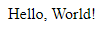
现在,我们来测试一下 PHP 是否能与 NGINX 兼容。我们可以创建一个简单的“Hello, World”PHP 脚本。.
NGINX 的默认根目录是 /var/www/html。.
让我们在该目录下创建一个名为 hello.php 的文件:
sudo nano /var/www/html/hello.php
在文件中添加以下内容:
<?php
echo 'Hello, World!';
保存文件,然后退出。(nano 编辑器快捷键:CTRL+X,Y, ENTER)。.
现在我们可以在浏览器中访问 http://。 /hello.php 访问。.
要获取服务器的公网 IP 地址,请使用以下命令:
hostname -I
如果上述方法无效,请尝试使用 cURL 获取服务器的公网 IP 地址:
curl -4 https://ip.hetzner.com
你应该看看这个:
结论
您已成功在 Ubuntu 24.04 LTS 上安装了 LEMP 架构。您可以开始部署 LEMP 架构应用程序了。祝您一切顺利!