
介绍
Python 数据类型用于定义变量的类型。本文将列出所有数据类型并讨论每种数据类型的功能。如果您是 Python 新手,请务必先查看我们的 Python 入门教程。如果您已经看过该教程,也请不要忘记查看我们之前关于 Python 注释和语句的教程。.
Python 数值数据类型
Python 中用于存储数值的数值数据类型,例如:
- int – 存储无限长度的有符号整数。.
- long - 保存长整数(Python 2.x 中存在,Python 3.x 中已弃用)。.
- 浮点数 – 存储精确的浮点数,精度可达小数点后 15 位。.
- 混合数——包含混合数字。.
在 Python 中,我们不需要像 C 或 C++ 那样在定义变量时指定数据类型。我们可以直接给变量赋值。但如果我们想知道变量当前存储的是哪种类型的数值,可以使用 `type()` 函数,如下所示:
#create a variable with integer value.
a=100
print("The type of variable having value", a, " is ", type(a))
#create a variable with float value.
b=10.2345
print("The type of variable having value", b, " is ", type(b))
#create a variable with complex value.
c=100+3j
print("The type of variable having value", c, " is ", type(c))
运行上述代码后,您将看到如下图所示的输出。.

Python 字符串数据类型

字符串是一系列字符。Python 支持 Unicode 字符。通常,字符串用单引号或双引号表示。.
a = "string in a double quote"
b= 'string in a single quote'
print(a)
print(b)
# using ',' to concatenate the two or several strings
print(a,"concatenated with",b)
#using '+' to concate the two or several strings
print(a+" concated with "+b)
上述代码会生成如下图所示的输出。
Python 列表数据类型

列表是 Python 特有的多功能数据类型。从某种意义上说,它类似于 C/C++ 中的数组。但 Python 列表的独特之处在于它可以同时存储不同类型的数据。一个标准的列表是用方括号 ([]) 和逗号 (,) 分隔的有序数据序列。.
 #list of having only integers
a= [1,2,3,4,5,6]
print(a)
#list of having only strings
b=["hello","john","reese"]
print(b)
#list of having both integers and strings
c= ["hey","you",1,2,3,"go"]
print(c)
#index are 0 based. this will print a single character
print(c[1]) #this will print "you" in list c
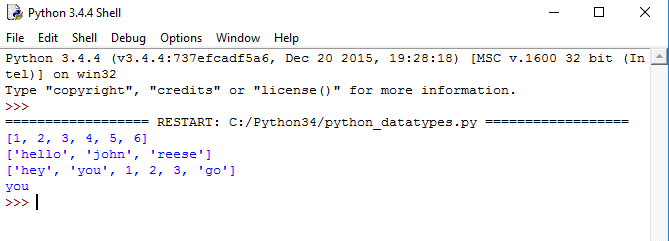
上述代码会生成如下输出:
Python 元组
元组是另一种数据类型,它类似于列表,也是一系列数据。但它是不可变的,这意味着元组中的数据是不可写的。元组中的数据使用括号和逗号来分隔。.
tuple having only integer type of data.
a=(1,2,3,4)
print(a) #prints the whole tuple
tuple having multiple type of data.
b=("hello", 1,2,3,"go")
print(b) #prints the whole tuple
#index of tuples are also 0 based.r code... */
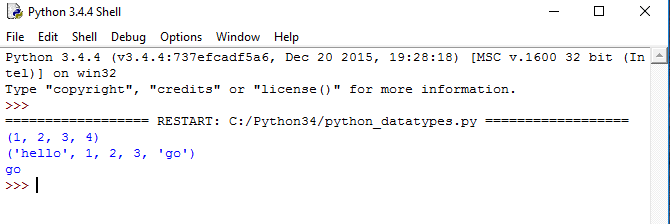
上述 Python 数据类型元组示例代码的输出结果如下所示。.
Python字典
Python 字典是一种无序的数据序列,以键值对的形式存储。它类似于哈希表。字典用花括号括起来,格式为 key:value。它非常适合从大量数据中高效地检索数据。.
 #a sample dictionary variable
a = {1:"first name",2:"last name", "age":33}
#print value having key=1
print(a[1])
#print value having key=2
print(a[2])
#print value having key="age"
print(a["age"])
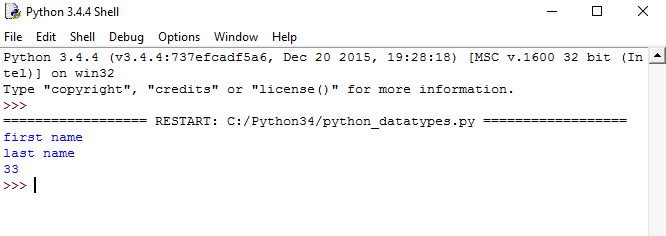
如果运行这段 Python 字典数据示例代码,输出结果将如下图所示。.
结果
今天关于Python数据类型的内容就到这里。别忘了在你的机器上运行每一段代码。还有,不要只是复制粘贴,尝试自己编写这些代码。.