Introduction
Are you confused about the distinction between mobile app and web development? Although they seem interchangeable, they are not, especially when it comes to the technology and tools they use as well as the features they bring. Understanding these distinctions is crucial to developing a successful digital product. In this post, you will learn the difference between mobile and web apps and gain insights that will help you decide whether to build one or the other. So, let’s compare and contrast a mobile app vs. web app.
Another difference between mobile developer vs web development is that there are two techniques for developing and delivering mobile applications which are: native apps and web apps. Other areas of app development include hybrid mobile apps and advanced web apps. Before you fully engage in your app development, you should first choose which form of app suits your budget, goals and objectives. This will help you in deciding whether to develop a mobile app or develop a responsive website for mobile. You can also join the Java Full Stack Developer training for a better understanding.
As companies now have a lot of web developers on their roster, app developers are in demand due to the increasing use of smartphones. The most notable aspect is how a web developer differs from an app developer in today’s reality. Hence, in this post, we will cover mobile developer vs web developer on various parameters.
Mobile app development vs. web development
1. Definition
The distinction between website development and app development is vast. For example, the definitions of app development vs. web development alone are not enough to illustrate the two. One is for building mobile apps that work on Google Play and the App Store, while the other is for developing web pages that run “on the web as well as on Google Play and the App Store.”.
Mobile Apps are software programs that run on smartphones and tablets. They may be downloaded from an app store such as Google Play or the Apple Store and installed on the user's device. Apps are created to run on specific operating systems or platforms, such as iOS for Apple products or Android for Android smartphones and tablets, and have access to system resources such as cameras, storage, microphones, contacts, etc. Facebook Messenger, Snapchat, Instagram, Twitter, and Tumblr are some of the most popular apps.
On the other hand, web applications are accessible through a web browser and are highly compatible with any device. Since web applications are not native to any device and do not require downloading or installation, their appearance and functionality are very similar to mobile apps, which can be confusing for users. It is also important to remember that before designing web applications, every web developer must master certain skills.
So, now that you have a basic understanding of mobile apps and web apps, let's explore further by learning how to build these apps first.
2. Manufacturing process
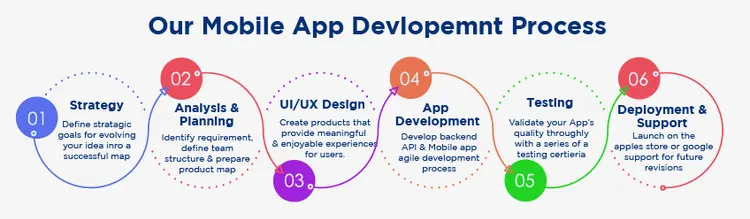
A build is a version of an application, usually a pre-release version, and is identified by a build number rather than a release number in a development environment. A software build is simply a collection of computer code in the form of a build package ready for use by consumers. The DevOps team compiles the source code, such as Java or C++ code, into binary form to ensure the performance and quality of the code before shipping it. The software is continuously updated until the developer decides to stop supporting it. This may include a set of builds and multiple public software releases.
Iterative builds, also known as active integration, are an important part of the product development phase where application components are regularly assembled and built for testing to ensure a stable end result. In addition, build tools allow web and mobile application developers to outsource certain programming processes, streamlining the process.
A developer is often hired by a company to create a native or hybrid mobile app. If you have programming skills, you can also try your hand at creating a mobile app. Previously, you had to use a software development kit (SDK) for Android, iOS, or Windows Phone to create an app for those platforms. In mobile app development, you can now use middleware languages like JavaScript.
Native mobile apps are built by developers using a platform-approved language. A mobile app is downloaded from an app store and stored on the device's memory. The mobile app is accessed by tapping its icon. Many smartphone applications are designed to be used when there is no internet connection.
Native apps have an advantage over online apps because they can access devices and other functions that are used to provide the services the app claims to provide, such as GPS, sensors, storage, camera, flashlight, address book, etc.
Web application development
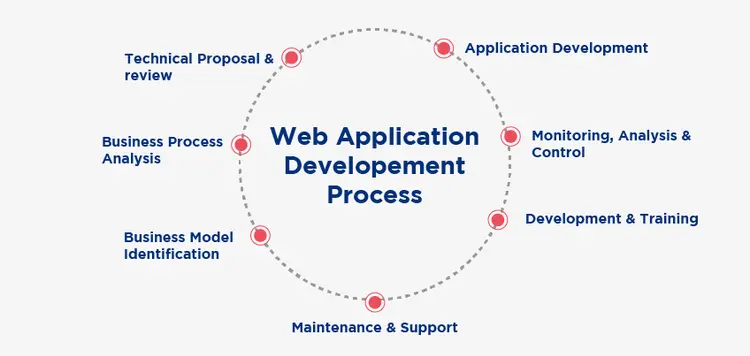
In terms of web design, hybrid apps offer more freedom. HTML5, CSS, and JavaScript may all be used together. This is due to the fact that they are web apps that look and feel like native apps. As a result, many developers believe that hybrid apps are faster and easier to create. While hybrid apps can take advantage of many aspects of your mobile device, they are driven by an internet browser, while native apps do not.
A mobile web app is often created by combining two types of programming languages. Client-side programming languages, such as JavaScript or CSS, rely on your web browser to run the apps. Server-side programming is usually written in languages such as Python, Objective-C, or Java.
This section of code is responsible for receiving, storing, and transmitting data from the browser to the server. There is also HTML, which is a markup language.
A developer or a team of developers led by a software engineer can create a web application. A web application works by receiving user input, often provided via a web form. This data is passed to the application server, which performs the requested operations and returns the results to the browser, which can be on a desktop or mobile device.
3. Performance
There is a functional difference between web development and mobile app development.
In software engineering and information systems, a functional requirement specifies a function of a system or process, where a function can be defined as a description of the behavior between user interactions, whether output or input.
Performance of mobile apps vs. web apps
Compared to full-fledged website visitors, mobile app users often get limited functionality, and many of these apps are focused on a specific purpose. For example, smartphone apps like Lego only let you play games, while financial apps like TurboTax help you calculate your taxes, and entertainment apps like Twitter let you interact with others.
Native mobile apps are designed for the unique features of the device and work on smartphones and tablets.
Web apps offer a wider range of functionality than mobile apps. For example, Adobe Photoshop offers both a mobile app and a web version to its customers. On the other hand, the smartphone app has limited options for drawing and painting, but the online apps allow you to use all the features of Adobe Photoshop and provide a superior user experience. Google Applications, Microsoft 365, and Gmail are other examples of online apps.
Web applications are accessed using web browsers and are therefore compatible with the user's device. Web applications, unlike native mobile apps, are not local to any specific system or device and hence do not require installation or download.
The best thing about web applications is that they are responsive enough to the devices they are used on and can sometimes act as a mobile app.
4. Platform Dependency
Platform-specific applications are those that run only on one operating system on one computer set (one operating environment), such as Solaris on SPARC hardware.
These fall into the category of native apps, which are built to work with something like the mobile device's operating system (OS). For example, if you own an iPhone, you can only install apps designed for iOS, not Microsoft or Android. Native apps cannot be combined.
These apps can also fall into the hybrid category. A hybrid app is essentially a web app wrapped in a native app shell. You install hybrid apps on your device the same way you would native software, but they can run on multiple operating systems. As a result, you can create a hybrid app that runs on Android, iOS, and Windows.
Web apps offer a wider range of functionality than mobile apps. For example, Adobe Photoshop offers both a mobile app and a web version.
Many companies offer online and mobile versions of their products. The main difference between mobile apps and online or web apps is that web apps are standalone. You can use a web app if you are connected to the internet. Mobile apps, like desktop apps, are not visible unless they are explicitly installed on a device.
5. Connection and update
In web development or mobile development, internet connectivity or other system functions are required to help the application run smoothly and provide the said services. At the same time, updates help in performing the functions of the applications in the desired manner.
- The main distinction between the two is that mobile apps may often work when interrupted.
- Mobile apps are often faster and more efficient than online apps. However, to maintain optimal performance, users need to download updates regularly.
- Online applications require an active internet connection to function.
- While they update their web applications.
6. Education
While the exact duties of IT professionals vary greatly, most professionals in this area have at least a bachelor's degree. Computer science or engineering, electrical engineering, information science, informatics, and information technology are some of the most common majors. Specific educational qualifications for web development versus mobile development careers include:
Most businesses want mobile app developers to have a bachelor's degree in software engineering, mobile computing, computer science, mobile application development, or any field of study focused on programming.
The traditional path for aspiring web developers is a bachelor's degree in computer science or web development. While an associate's degree may land you an entry-level web development job, some jobs prefer those with a bachelor's degree.
7. Skills
The IT job description for web development or Android development also includes the skillset required to find a job.
The languages and frameworks used in mobile app development are limited. There are several mobile app development languages and frameworks available to app developers. JavaScript, Python, Swift, and Ruby are some of the most popular languages. Spring and Rails are prominent frameworks.
They also offer their own integrated development environments (IDEs).
For example, iOS developers may use the Swift programming language, Objective-C, and the XCode IDE, while Android developers may use Java or Kotlin with the Eclipse IDE. HTML, JavaScript, and CSS are the most commonly used languages for hybrid apps.
To be a successful mobile developer, you need to have a mix of technical and non-technical abilities. The following are some of the most common talents required for mobile development positions:
- Comprehensive knowledge of application design concepts, user experience (UX) and user interface (UI).
- Knowledge of computing and application programming interfaces (APIs)
- Ability to develop, test, and debug code in a variety of programming languages including JavaScript, Java, Kotlin, Swift, C++, C#, and Python.
- Capacity to research, design, build, deploy, and manage mobile applications that meet the demands of customers and users.
- Capacity to evaluate existing mobile applications, find areas for improvement, make recommendations for modifications, and implement improvements
- Strong critical thinking, time management, and problem-solving abilities are required, as well as creativity and attention to detail.
- The capacity to communicate effectively, collaborate as part of a team, and remain adaptable.
- Learn about the latest mobile app developments and how to apply them in a business environment.
Keep in mind that the qualities you need to be successful may vary depending on the role. The skills described above are just a few of the fundamentals required to succeed in mobile development.
There are several web development languages and frameworks available to developers. HTML, JavaScript, Python, PHP, and Ruby are some of the most popular. Laravel and Rails are prominent frameworks.
Web development skills
Web development skills and abilities vary depending on the specialization, however, every potential web developer should have or learn the following:
- Ability to write high-quality code in programming languages such as HTML, CSS, jQuery, and JavaScript
- Capacity to test code, find problems, address issues, and track code changes
- Knowledge of website development tools such as libraries, frameworks, content management systems (CMS), bug tracking tools, and code versioning software is required.
- High computer literacy, attention to detail, critical thinking, and problem-solving abilities are required.
- Broad understanding of user experience (UX) concepts and best practices for SEO (search engine optimization).
- Understand how databases, hosting sites, APIs (application programming interfaces), operating systems, and servers work.
Other less technical qualities, such as excellent communication skills and the ability to connect with people, will be useful as a web developer. People in this industry also need to be able to manage their time effectively, differentiate between critical and non-critical tasks, and stay organized when working on multiple projects.
How are they similar?
Mobile app development and web development are similar because of the way they both have to learn coding and frameworks and have to be able to meet the needs of the client. Both are meant to be done for mobile, while web app naturally supports web platforms.
What should you choose between mobile app and web development?
While deciding which is better, web development or Android development, your overall goals should influence whether you design a mobile app or a web app. For example, games and other standalone applications may be better suited for a mobile app. On the other hand, web applications can help you reach a wider audience, as they are all accessible with a web browser. A web app also eliminates concerns about device compatibility.
Mobile apps can communicate even when the internet is not available, while a web app cannot. Another factor to consider when deciding between a web app and a mobile app is that many online apps do not have access to all the functions of your phone.
If this is essential for you, a mobile app may be a better fit for your project.
One advantage of web applications over mobile apps is the ability to make more dynamic updates. When you publish changes to the web server, they are immediately visible to all users of the web application. When it comes to mobile apps, you have to wait for consumers to download the latest version before they can benefit from your changes.
Result
When mobile app data is compared to web app statistics, mobile apps have more active users. According to recent mobile app statistics, the Google Play Store has over 3.5 million apps and the Apple App Store has over 2.25 million apps.
The ultimate goal of your project will determine whether you design a mobile app or a web app. For example, if you are developing a game or similar standalone software, a smartphone app might be acceptable. However, if you want to reach a large audience via the internet, a web app provides more freedom.