Introduction
Deciding between synchronous and asynchronous programming models is not just a technical issue in software development; it affects how applications work together, complete tasks, and respond to user input. Keep in mind that choosing the right model can determine the success or failure of a project, especially when comparing the two paradigms. The goal of this article is to clear up some of the confusion surrounding these concepts by making a clear distinction between synchronous and asynchronous programming and explaining their advantages, disadvantages, and best practices. By understanding each strategy thoroughly, developers can make smart decisions and tailor their approach to the needs of their applications.
Understanding Concurrent Programming
What is concurrent programming?
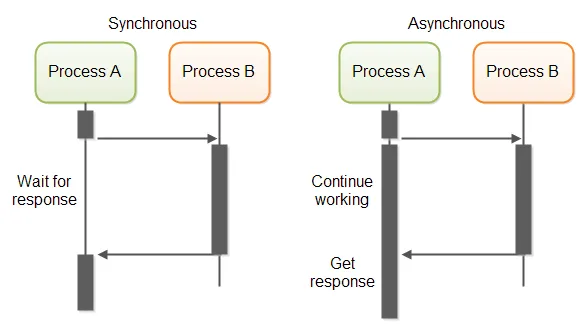
In concurrent programming, tasks are performed sequentially. Like a book, you start at the beginning and read each word and line. Concurrent programming requires each task to be completed before the next task can begin. The flow of control is predictable and simple.
The system may become stuck or unresponsive if a task takes too long. Blocking behavior is one of the prominent features of concurrent programming.
How does it work?
The concurrent programming model proceeds operations linearly. This process is simplified as follows:
- The program execution is sequential.
- Tasks are executed in the order of the code.
- From top to bottom, each line of code is executed.
If a task takes a long time, such as reading a large file or waiting for human input, the program will block until the task is completed. Concurrent programming blocks.
Use cases where concurrent programming stands out
Concurrent programming is especially useful in scenarios where tasks must be executed in a specific order. For example, if you want to bake a cake, you can't put it in the oven before you've mixed the ingredients. Similarly, in an application, you might need to retrieve data from a database before you can process it.
Example: Reading a file sequentially
Here is an example of how concurrent programming works in the context of reading files:
function readFilesSequentially(fileList) {
for each file in fileList {
content = readFile(file) // This is a blocking operation
process(content)
}
}
In this pseudocode, the function readFile(file) It is a synchronous operation. Function process(content) Until readFile(file) It has not finished reading the file completely, it will not execute. This is a clear demonstration of the sequential and blocking nature of concurrent programming.
Asynchronous Programming Review
What is asynchronous programming?
Asynchronous programming is a paradigm that allows tasks to be executed concurrently, rather than sequentially. This means that the program execution does not need to wait for one task to complete before moving on to the next. It's like being at a buffet - you don't have to wait for someone to finish their meal before you can start.
In asynchronous programming, tasks are often started and then set aside to allow other tasks to run. Once the main task is finished, it can be resumed from where it left off. This non-blocking property is one of the key features of asynchronous programming.
How does it work?
Simultaneous execution: One of the main aspects of asynchronous programming is the ability to execute multiple tasks concurrently. This can lead to significant increases in application efficiency and performance, especially in scenarios where tasks are independent or require waiting for external resources such as network requests.
Non-blocking nature: Asynchronous programming does not block the rest of the program because it does not wait for long-running tasks such as I/O operations. In user interface programming, this can improve user experience and responsiveness.
Use cases where asynchronous programming should be used
I/O-dependent tasks are often programmed asynchronously. Asynchronous tasks can be used in web development to send API requests, access databases, and handle user input without interrupting the main thread.
Example: AJAX requests in web development with pseudocode
Asynchronous programming can be used to send AJAX requests in web development. See the following example:
function fetchAndDisplayData(url) {
// This is a non-blocking operation
data = asyncFetch(url);
data.then((response) => {
// This code will run once the data has been fetched
displayData(response);
});
}
In the pseudocode above, the function asyncFetch(url) It is an asynchronous operation. Function displayData(response) Until asyncFetch(url) The process has not finished receiving data, it is not executing. Meanwhile, other code can continue to run in the background, demonstrating the non-blocking nature of asynchronous programming.
Comparing asynchronous and synchronous programming
The differences between synchronous and asynchronous programming in terms of performance, program execution, and runtime are as follows:
Program execution
Simultaneously: In a concurrent system, tasks are executed sequentially, one after the other. The result is that the flow of control is easy to predict and implement.
Asynchronous: In an asynchronous environment, tasks can be executed concurrently. This means that the software does not need to wait for one task to complete before moving on to the next.
Performance
Simultaneously: With concurrent execution, if a task takes too long to complete, the entire system may freeze or become unresponsive.
Asynchronous: The non-blocking nature of asynchronous programming can lead to a more responsive and seamless user experience, especially in the context of user interface development.
Occasion of programs
Simultaneously: Ideal for situations that require steps to be performed in a predetermined order.
Asynchronous: Tasks are considered asynchronous when they are I/O-dependent rather than CPU-dependent.
When to use asynchronous programming
- Web-based applications: To prevent the main thread from being interrupted, asynchronous tasks can be used to perform operations such as making API requests.
- Database Management: Data read and write operations can be time-consuming and do not need to be completed before other tasks can be performed.
- User interface programming: Asynchronous programming enables a more responsive and fluid user experience when handling user input.
- File I/O operations: In general, time-consuming file I/O operations do not need to finish before proceeding to the next step.
Event loop and call stack
In JavaScript, working with asynchronous code effectively requires understanding the event loop and its call stack. Simply put, this is where the call stack executes code in order. Concurrent tasks are executed first, and the event loop is finally allowed to execute any asynchronous code statements, such as setTimeout Or handle API requests after processing the code synchronously.
This is how JavaScript appears to be doing a lot of things at the same time, even though it is technically single-threaded. While these asynchronous operations are running, the event loop ensures that all the data is processed in a timely manner without blocking the main thread.
Understanding how the event loop and call stack interact helps us write better asynchronous code and avoid common problems like freezing UI or extremely slow interactions.
Asynchronous Programming Using Web Workers
The next tool that is very useful for managing tasks asynchronously is Web Workers They allow us to run JavaScript in the background without blocking the main thread, which is very useful for performance and tasks that we need to do, such as complex calculations or retrieving large amounts of data. Web Workers give us true concurrency, meaning we can move heavy work to another thread and keep the main thread in charge. However, one thing to keep in mind is that Workers do not have access to the DOM and are therefore better suited for tasks that do not require direct UI updates.
Here's a quick example of how to use Web Workers:
// In the main script
const worker = new Worker("./worker.js");
worker.postMessage("Start the task");
// In the worker script (worker.js)
onmessage = function (event) {
// Perform long-running task here
postMessage("Task done");
};
When to use concurrent programming
- Receive and process data sequentially: For some applications, retrieving data from a database is a prerequisite for processing that data.
- Writing basic scripts: When working with small scripts, concurrent programming may be easier to understand and debug.
- CPU-dependent tasks: Performing heavy operations that are CPU-dependent. Concurrent programming may be more efficient for CPU-dependent tasks rather than I/O-dependent tasks.
Practical examples in code
Concurrent code example: Processing a list of tasks sequentially
In concurrent programming, tasks are processed sequentially. Here is an example in Python:
import time
def process_userData(task):
# Simulate task processing time
time.sleep(1)
print(f"Task {task} processed")
tasks = ['task1', 'task2', 'task3']
for task in tasks:
process_userData(task)
Tasks are executed sequentially by this concurrent method. process_userData are processed. If a task takes a long time to complete, subsequent tasks have to wait because of this sequential processing which can cause delays. Application performance and user experience may suffer due to this issue.
Asynchronous Code Example: Receiving Data from Multiple Sources Simultaneously
In contrast, asynchronous programming allows tasks to be processed concurrently. Here is an example in Python using the library asyncio It is given:
import asyncio
async def retrieve_data(source):
# Simulate time taken to fetch data
await asyncio.sleep(1)
print(f"Data retrieved {source}")
sources = ['source1', 'source2', 'source3']
async def main():
tasks = retrieve_data(source) for source in sources]
await asyncio.gather(*tasks)
asyncio.run(main())
The asynchronous method starts multiple processes at the same time. This ensures that the application can move from one task to another without interruption. By doing this, we can improve the application performance and user experience. However, managing tasks and callbacks can make implementation more difficult.
console.log("Start"); // First task (synchronous) - goes to call stack
setTimeout(() => {
console.log("Timeout callback"); // This task(aysnchronous) is put into the event loop
}, 1000);
console.log("End"); // Second task (synchronous) - in call stack
Call Stack:
Function console.log('Start') It is executed first because it is a synchronous operation. The function is processed and immediately removed from the call stack.
Function setTimeout() It is an asynchronous function, so its callback is console.log('Timeout callback') It is delayed and sent to the event loop to be executed after 1 second (1000 milliseconds), but itself setTimeout() It does not block code execution.
Then console.log('End') It executes because it is a concurrent operation that is on the main thread.
Event Loop:
After concurrent tasks (such as console.log('Start') and console.log('End')) are executed, the event loop waits for a 1 second delay and then the asynchronous callback given to setTimeout Processes.
Once the callback is ready, the event loop pushes it onto the call stack and then executes. ''Timeout callback'' Prints.
Output:
Start
End
Timeout callback
This example shows how JavaScript executes synchronous tasks first, then processes asynchronous tasks using the event loop after the main call stack is cleared.
Best practices and patterns for effectively using each programming model
Concurrent programming
- Use when simplicity is important: Concurrent programming is simple and understandable, so it is ideal for simple tasks and scripts.
- Avoid it for I/O-dependent tasks: Concurrent programming can block the executing thread while waiting for I/O operations (such as network requests or disk reads/writes). Use asynchronous programming for such tasks to avoid blocking.
Asynchronous programming
- Use for I/O-dependent tasks: Asynchronous programming works brilliantly when you're dealing with I/O-dependent tasks. It allows the executing thread to continue performing other tasks while waiting for the I/O operation to complete.
- Pay attention to common resources: Asynchronous programming can lead to race conditions if multiple tasks are accessing and modifying shared resources. To avoid this problem, use synchronization mechanisms such as locks or semaphores.
Common design patterns
Concurrent programming
The most common pattern in concurrent programming is the sequential execution pattern, in which tasks are executed one after the other.
Asynchronous programming
- Promises: Promises represent a value that may not yet be available. They are used to handle asynchronous operations and provide methods for attaching callbacks that are called when the value becomes available or when an error occurs.
- Async/Await: This feature is a kind of syntactic candy on top of promises that makes asynchronous code look similar to synchronous code. This makes asynchronous code easier to write and understand.
How to avoid common problems
Callback Hell
«"Callback hell" refers to the nesting of calls that makes code unreadable and unintelligible. Here are some ways to avoid it:
- Modularize your code: Divide your code into smaller, reusable functions.
- Using Promises or Async/Await: These JavaScript features can clean up your code and make it more readable and understandable.
- Error handling: Always consider error handling for your callbacks. Unhandled errors can lead to unpredictable results.
Asynchronous Programming – Memory Management
I want to share a few tips on how to effectively manage memory when working with asynchronous programming, as improper handling can lead to performance issues such as memory leaks.
Memory management in asynchronous programming
When working with asynchronous code, it is very important to pay attention to how memory is allocated and how it is cleaned up. This concerns long-running tasks or promises that remain unresolved and can lead to memory leaks if not managed properly.
Garbage Collection
In JavaScript, memory is managed by the garbage collector. The garbage collector automatically cleans up memory that is no longer used by the program. But when using asynchronous programming, if we are not careful, more memory may remain than is needed. For example, promises that never resolve, event listeners that are still attached, or timers that are running may hold larger chunks of memory.
Common causes of memory leaks in asynchronous code
- Unresolved promises: If a promise is never resolved or rejected, it can prevent memory from being cleaned up.
let pendingPromise = new Promise(function (resolve, reject) {
// This promise never resolves
});- Event Listeners: It's easy to forget to remove an event listener when it's no longer needed. This causes unnecessary memory consumption.
element.addEventListener("click", handleClick);
// Forgetting to remove the listener
// element.removeEventListener('click', handleClick);- Timers: Use of
setTimeoutOrsetIntervalNot clearing them when they are no longer needed can result in memory being retained for longer than necessary.
var timer = setInterval(function () {
console.log("Running.");
}, 1000);
// Forgetting to clear the interval
// clearInterval(timer);
Best practices to prevent memory leaks
- Promises, resolve or reject: A promise must be resolved or rejected to ensure that its memory is freed when it is no longer needed.
let myPromise = new Promise((resolve, reject) =>
setTimeout(() => {
resolve("Task complete");
}, 1000),
);
myPromise.then((result) => console.log(result));- Removing Event Listeners: Once event listeners are attached, remove them when they are no longer needed, either because the corresponding element has been removed or its functionality is no longer needed.
element.addEventListener("click", handleClick);
// Proper cleanup when no longer needed
element.removeEventListener("click", handleClick);- Clear Timers: If from
setTimeoutOrsetIntervalIf you use them, remember to clean them up when they're done to avoid unnecessary memory retention.
var interval = setInterval(function () {
console.log('Doing something...');
}, 1000);
// Clear the interval when done
clearInterval(interval);
Weak References
Another advanced technique is to use WeakMap Or WeakSet It is for managing objects that may be automatically cleaned up by the garbage collector when they are no longer referenced in your code. These structures allow you to reference objects without preventing them from being cleaned up by the garbage collector.
let myWeakMap = new WeakMap();
let obj = {};
myWeakMap.set(obj, "someValue");
// If obj gets dereferenced somewhere else, it will be garbage-collected.
obj = null;
Result
Having concluded our discussion of synchronous and asynchronous programming models, it is clear that each has its own advantages that make it suitable for certain situations. Because synchronous programming operates sequentially and non-blockingly, it is easy to understand and is great for tasks that need to be performed linearly.
On the other hand, asynchronous programming, known for its non-blocking nature and ability to execute multiple tasks simultaneously, works best when responsiveness and performance are required, especially for I/O-dependent operations. The use of either approach depends on your understanding of the application's needs, performance issues, and the user experience you want.