Introduction
The for loop in Python is a recursive function. If you have a sequence object such as a list, you can use the for loop to iterate over the items in the list. The functionality of the for loop is not much different from what you see in several other programming languages. In this article, we will explore the Python for loop in detail and learn to iterate over various sequences including lists, tuples, and more. In addition, we will learn to control the flow of the loop using the break and continue statements.
When to use for Loop
Whenever you need to repeat a block of code multiple times, use a “while loop” statement instead if you don’t know how many times it should be repeated.
Syntax of the for loop
The basic syntax of a for loop in Python looks something like the one listed below.
for itarator_variable in sequence_name:
Statements
. . .
Statements
Python for loop syntax in detail
- The first word of the statement starts with the keyword “for”, which means the start of the for loop.
- Then we have the iterator variable which iterates over the sequence and can be used inside the loop to perform various functions.
- The next thing is the “in” keyword in Python, which tells the iterator variable to loop over the elements inside the sequence.
- And finally, we have the sequence variable, which can be a list, a tuple, or any other type of iterator.
- The loop statements section is where you can play with the iterator variable and perform various functions.
Print individual letters of a string using a for loop
A Python string is a sequence of characters. If in any of your programming programs, you need to iterate through the characters of a string individually, you can use a for loop here.
Here's how you can do it.
word="anaconda"
for letter in word:
print (letter)
a
n
a
c
o
n
d
a
The reason this loop works is that Python considers a "string" as a sequence of characters, rather than looking at the string as a whole.
Using the for loop to iterate over a Python list or tuple
Lists and tuples are iterable objects. Let's see how we can loop over the elements inside these objects.
words= ["Apple", "Banana", "Car", "Dolphin" ]
for word in words:
print (word)
Output:
Apple
Banana
Car
Dolphin
Now, let's go ahead and work on the elements of a tuple here.
nums = (1, 2, 3, 4)
sum_nums = 0
for num in nums:
sum_nums = sum_nums + num
print(f'Sum of numbers is {sum_nums}')
# Output
# Sum of numbers is 10
Python nested for loops
When we have a for loop inside another for loop, it is called a nested for loop. There are many uses of a nested for loop. Consider the example list above. The for loop prints individual words from the list. But what if we wanted to print the individual characters of each word in the list instead?
This is where a nested for loop works best. The first loop (the parent loop) will loop through the words one by one. The second loop (the child loop) will loop over the characters in each word.
words= ["Apple", "Banana", "Car", "Dolphin" ]
for word in words:
#This loop is fetching word from the list
print ("The following lines will print each letters of "+word)
for letter in word:
#This loop is fetching letter for the word
print (letter)
print("") #This print is used to print a blank line
Output:
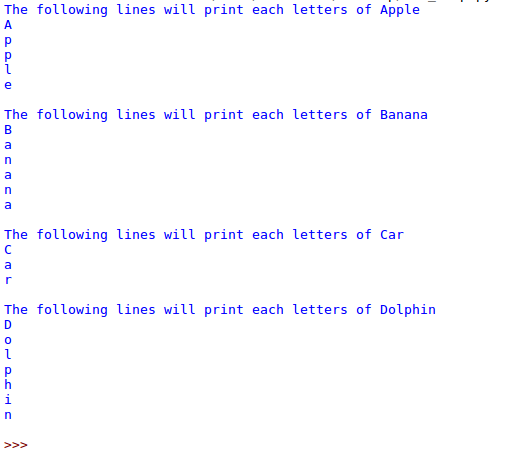
A nested loop is structurally similar to nested if statements.
For loop with range() function
Python range() is one of the built-in functions. The range function works really well when you want a for loop to run for a certain number of times, or need to specify a range of objects to print.
When working with range(), you can pass between 1 and 3 integer arguments to it:
startSpecifies the integer value at which the sequence starts, if this is not included, the sequence starts at 0.Stopis always required and is an integer that counts up to but not includingstepDetermines the amount of increment (or decrement in the case of negative numbers) the next iteration, if this is omitted the default step is 1.
Consider the following example where I want to print the numbers 1, 2, and 3:
for x in range(3):
print("Printing:", x)
# Output
# Printing: 0
# Printing: 1
# Printing: 2
The range function also takes another parameter apart from the start and stop. This parameter is the step. It tells the range function how many numbers to skip between each count.
In the example below, I have used the number 3 as the step and you can see that the output numbers are the previous number + 3.
for n in range(1, 10, 3):
print("Printing with step:", n)
# Output
# Printing with step: 1
# Printing with step: 4
# Printing with step: 7
We can also use a negative value for our step argument to iterate backwards, but we need to adjust the start and stop arguments accordingly:
for i in range(100,0,-10):
print(i)
Here 100 is the start value, 0 is the stop value, and -10 is the range, so the loop starts at 100 and ends at 0, decreasing by 10 with each iteration. This occurs in the output:
Output
100
90
80
70
60
50
40
30
20
10
When programming in Python, for loops often use the sequence type range() as their parameters for iteration.
Break statement with for loop
The break statement is used to exit the for loop prematurely. It is used to break the for loop when a certain condition is met. Suppose we have a list of numbers and we want to check if a number exists or not. We can iterate over the list of numbers and if the number is found, we can exit the loop because there is no need to iterate over the remaining elements.
In this case, we will use the Python if else condition along with our for loop.
nums = [1, 2, 3, 4, 5, 6]
n = 2
found = False
for num in nums:
if n == num:
found = True
break
print(f'List contains {n}: {found}')
# Output
# List contains 2: True
continue statement with for loop
We can use continue statements in a for loop to skip the execution of the body of the for loop for a specific condition. Suppose we have a list of numbers and we want to print the sum of positive numbers. We can use continue statements to skip the for loop for negative numbers.
nums = [1, 2, -3, 4, -5, 6]
sum_positives = 0
for num in nums:
if num < 0:
continue
sum_positives += num
print(f'Sum of Positive Numbers: {sum_positives}')
Python for loop with an else block
We can use the else block with Python's for loop. The else block is executed only if the for loop is not terminated with a break statement. Suppose we have a function that prints the sum of numbers if and only if all the numbers are even. If there is an odd number, we can use the break statement to terminate the for loop. We can print the sum in the else block so that it is printed when the for loop executes normally.
def print_sum_even_nums(even_nums):
total = 0
for x in even_nums:
if x % 2 != 0:
break
total += x
else:
print("For loop executed normally")
print(f'Sum of numbers {total}')
# this will print the sum
print_sum_even_nums([2, 4, 6, 8])
# this won't print the sum because of an odd number in the sequence
print_sum_even_nums([2, 4, 5, 8])
# Output
# For loop executed normally
# Sum of numbers 20
For loops using sequential data types
Lists and other types of data sequences can also be used as iteration parameters in for loops. Instead of iterating through range(), you can define a list and iterate through that list. We assign a list to a variable and then iterate over the list:
sharks = ['hammerhead', 'great white', 'dogfish', 'frilled', 'bullhead', 'requiem']
for shark in sharks:
print(shark)
In this case, we are printing each item in the list. Although we used the variable shark, we could have called the variable by any other valid name and gotten the same output:
Output
hammerhead
great white
dogfish
frilled
bullhead
requiem
The output above shows that the for loop iterates over the list, printing each item from the list on each line. Lists and other sequence-based data types such as strings and tuples are commonly used for loops because they are iterable. You can combine these data types with range() to add items to a list, for example:
sharks = ['hammerhead', 'great white', 'dogfish', 'frilled', 'bullhead', 'requiem']
for item in range(len(sharks)):
sharks.append('shark')
print(sharks)
Output
['hammerhead', 'great white', 'dogfish', 'frilled', 'bullhead', 'requiem', 'shark', 'shark', 'shark', 'shark', 'shark', 'shark']Here, for each item in the list of sharks, we've added a placeholder string of "shark." You can also use a for loop to build a list from scratch:
integers = []
for i in range(10):
integers.append(i)
print(integers)
In this example, the integers are initialized to an empty list, but the for loop fills the list as follows:
Output
[0, 1, 2, 3, 4, 5, 6, 7, 8, 9]
Similarly, we can iterate through strings:
sammy = 'Sammy'
for letter in sammy:
print(letter)
Output
S
a
m
m
yIterating through tuples is done in the same format as iterating through lists or strings above. When iterating through a dictionary, it is important to keep the key:value structure in mind to ensure that you are calling the correct element of the dictionary. Here is an example that calls both the key and the value:
sammy_shark = {'name': 'Sammy', 'animal': 'shark', 'color': 'blue', 'location': 'ocean'}
for key in sammy_shark:
print(key + ': ' + sammy_shark[key])
Output name: Sammy animal: shark location: ocean color: blue
When using a dictionary with for loops, the iterating variable corresponds to the dictionary keys, and dictionary_variable[iterating_variable] corresponds to the values. In the above case, the iterating variable key was used to represent the key, and sammy_shark[key] to represent the values. Loops are often used to iterate and manipulate sequential data types.
Result
The for loop in Python is very similar to other programming languages. We can use break and continue statements with the for loop to change execution. However, in Python, we can also optionally block another loop.