
Introduction
When designing a database, there may be times when you want to place restrictions on the data allowed in certain columns. For example, if you are creating a table that holds information about skyscrapers, you may want the column that holds the height of each building to disallow negative values.
Relational database management systems (RDBMS) allow you to control what data is added to a table with constraints. A constraint is a special rule that applies to one or more columns—or the entire table—and limits the changes that can be made to the table's data, via a statement. INSERT, UPDATE, or DELETE It limits.
This article examines in detail what constraints are and how they are used in RDBMS. It also goes through each of the five constraints defined in the SQL standard and explains the corresponding functions.
What are the limitations?
In SQL, a constraint is any rule applied to a column or table that limits the data that can be inserted into it. Whenever you try to perform an operation that changes the data stored in the table – such as an INSERT, UPDATE, or DELETE statement – the RDBMS tests whether that data violates the existing constraints and, if so, returns an error.
Database administrators often rely on constraints to ensure that the database adheres to a defined set of business rules. In the context of a database, a business rule is any policy or procedure that a business or other organization follows and that its data must adhere to. For example, suppose you are building a database that catalogs the inventory of a customer's store. If the customer specifies that each product record must have a unique identification number, you can create a column with a UNIQUE constraint that ensures that no two entries in that column are the same.
Constraints are also useful for maintaining data integrity. Data integrity is a broad term often used to describe the overall accuracy, consistency, and rationality of data held in a database, based on its specific use cases. Tables in a database are often related, and columns in one table are dependent on values in another table. Since data entry is often prone to human error, constraints are useful in cases like this, as they can ensure that no erroneously entered data can affect such relationships and thus compromise the integrity of the database data.
Imagine you are designing a database with two tables: one to list the current students at a school and another to list the members of that school's basketball team. You can apply a foreign key constraint to a column in the basketball team table that references a column in the school table. This establishes a relationship between the two tables by requiring each entry in the team table to reference an entry in the students table.
Users define constraints when they first create a table, or they can add them later with the ALTER TABLE statement as long as they do not conflict with any data already in the table. When you create a constraint, the database system automatically creates a name for it, but in most SQL implementations you can add a custom name for each constraint. These names are used to refer to the constraints in ALTER TABLE statements when they are altered or dropped.
The SQL standard formally defines only five constraints:
- Primary key
- Foreign key
- Unique
- Review
- It is not empty.
Now that you have a general understanding of how constraints are used, let's take a closer look at each of these five constraints.
Primary key
The PRIMARY KEY constraint requires that each entry in a given column be unique and not NULL, allowing you to use that column to identify each individual row in the table.
In the relational model, a key is a column or set of columns in a table where each value is guaranteed to be unique and not contain any NULL values. A primary key is a special key whose values are used to identify individual rows in a table, and the column or columns that make up the primary key can be used to identify the table in the rest of the database.
This is one of the important aspects of relational databases: with a primary key, users don't need to know that their data is physically stored on a machine, and their DBMS can track each record and retrieve them ad hoc. In turn, this means that the records have no defined logical order, and users can retrieve their data in any order or through any filter they want.
You can create a primary key in SQL with a PRIMARY KEY constraint, which is essentially a combination of UNIQUE and NOT NULL constraints. Once the primary key is defined, the DBMS automatically creates an index associated with it. An index is a database structure that helps in faster retrieval of data from a table. Like an index in a textbook, queries only have to examine the entries of the indexed column to find the related values. This is what allows the primary key to act as an identifier for each row in the table.
A table can only have one primary key, but like regular keys, a primary key can consist of more than one column. That being said, a defining characteristic of primary keys is that they use only the minimum set of attributes needed to uniquely identify each row in a table. To illustrate this idea, imagine a table that stores information about students in a school using the following three columns:
studentID: Used to store each student's unique identification numberfirstName: Used to hold each student's first nameLastName: Used to hold the last name of each student
It is possible that some students in a school could share a first name, which would make the firstName column a poor choice for a primary key. The same is true for the lastName column. A primary key consisting of both the firstName and lastName columns could work, but there is still a chance that two students could share a first and last name.
A primary key consisting of the student ID and the firstName or lastName columns could work, but since each student's ID number is already unique, including each of the name columns in the primary key is redundant. So in this case, the minimum set of attributes that can identify each row, and therefore is a good choice for the table's primary key, is the studentID column alone.
If a key consists of observable, usable data (i.e., data that represents real-world entities, events, or properties), it is called a natural key. If the key is generated internally and does not represent anything outside the database, it is known as a surrogate or artificial key. Some database systems do not recommend the use of natural keys because even seemingly fixed data points can change in unpredictable ways.
Foreign key
The FOREIGN KEY constraint requires that each entry in a given column must already exist in a specific column from another table.
If you have two tables that you want to relate to each other, one way you can do this is to define a foreign key with a FOREIGN KEY constraint. A foreign key is a column in one table (the “child” table) whose values come from a key in another table (the “parent”). This is a way of expressing a relationship between two tables: A FOREIGN KEY constraint requires that the values in the column it applies to must exist in the column it references.
The following diagram shows such a relationship between two tables: one used to record information about a company's employees and the other used to track the company's sales. In this example, the primary key of the EMPLOYEES table is referenced by the foreign key of the SALES table:
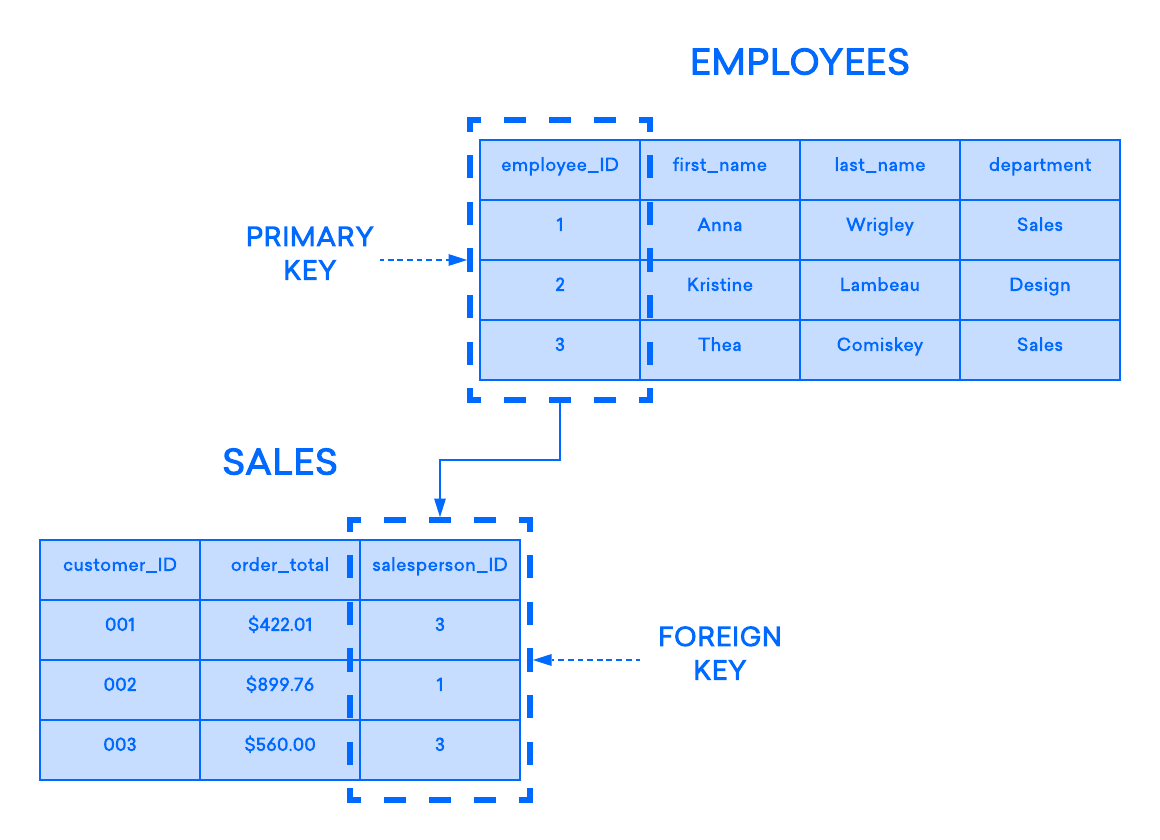
If you try to insert a record into a child table and the value entered in the foreign key column does not exist in the primary key of the parent table, the insert statement will be invalid. This helps maintain integrity at the relationship level, as rows from both tables are always correctly related.
Most often, the foreign key of a table is the primary key of the parent table, but this is not always the case. In most RDBMSs, any column in the parent table that has a UNIQUE or PRIMARY KEY constraint can be referenced by the foreign key of the child table.
Unique
The UNIQUE constraint prevents any duplicate values from being added to the given column.
As the name suggests, a UNIQUE constraint requires that each entry in a given column be a unique value. Any attempt to add a value that already appears in the column will result in an error.
UNIQUE constraints are useful for enforcing one-to-one relationships between tables. As mentioned earlier, you can establish a relationship between two tables with a foreign key, but there are several types of relationships that can exist between tables:
یک به یکOne to many: In a many-to-any relationship, a row in the parent table can relate to multiple rows in the child table, but each row in the child table can relate to only one row in the parent.How many?: If rows in the parent table can be related to multiple rows in the child table and vice versa, the two are said to have a many-to-many relationship.
By adding a UNIQUE constraint to a column that has a FOREIGN KEY constraint applied to it, you can ensure that each entry in the parent table appears only once in the child, thus establishing a one-to-one relationship between the two tables.
Note that you can define UNIQUE constraints at the table level as well as at the column level. When defined at the table level, a UNIQUE constraint can apply to more than one column. In cases like this, each column in the constraint can have duplicate values, but each row must have a unique combination of values in the constrained columns.
Review
A CHECK constraint defines a condition for a column, known as a predicate, that any value entered into it must satisfy.
CHECK constraint predicates are written as an expression that can evaluate to TRUE, FALSE, or potentially unknown. If you try to enter a value into a CHECK constraint and that value causes the statement to evaluate to TRUE or unknown (which happens for NULL values), the operation will succeed. However, if the expression evaluates to FALSE, it will fail.
CHECK predicates often rely on a mathematical comparison operator (such as <, >, <=, OR >=) to restrict the range of data allowed in a given column. For example, one common use for CHECK constraints is to prevent negative values from being held in some columns in cases where a negative value would not make sense, as in the example below.
This CREATE TABLE statement creates a table called productInfo with columns for the name, ID number, and price of each product. Since it doesn't make sense for a product to have a negative price, this statement applies a CHECK constraint on the price column to ensure that it only has positive values:
CREATE TABLE productInfo (
productID int,
name varchar(30),
price decimal(4,2)
CHECK (price > 0)
);
Every CHECK predicate must not use a mathematical comparison operator. Typically, you can use any SQL operator that can evaluate to true, false, or unknown in a check predicate, including LIKE, BETWEEN, IS NOT NULL, and so on. Some, but not all, SQL implementations even allow you to include a subquery in a CHECK predicate. However, note that most implementations do not allow you to reference another table in a statement.
It is not empty.
The NOT NULL constraint prevents any NULL values from being added to the given column.
In most SQL implementations, if you insert a row of data but do not specify a value for a particular column, the database system will default to representing the missing data as NULL. In SQL, NULL is a special keyword used to represent an unknown, missing, or unspecified value. However, NULL is not a value itself, but rather the state of an unknown value.
To illustrate this difference, imagine a table used to track clients at a talent agency that has columns for each client’s first and last name. If a client uses a single name—such as “Cher,” “Usher,” or “Beyoncé”—the database administrator might enter only one name in the first name column, which would cause the DBMS to insert NULL in the last name column. The database does not consider a client’s last name to be literally “null.” It just means that the value of the last name column for that row is unknown or that the field does not apply to that particular record.
As the name suggests, the NOT NULL constraint prevents any value in the given column from being NULL. This means that for any column with a NOT NULL constraint, you must specify a value for it when inserting a new row. Otherwise, the INSERT operation will fail.
Result
Constraints are an essential tool for anyone looking to design a database with a high level of data integrity and security. By restricting the data that is entered into a column, you can ensure that relationships between tables are properly maintained and that the database adheres to the business rules that define its purpose.