
Introduction
The Python programming language is an interface that can be implemented in many different ways. Some examples include CPython which uses the C language, Jython which is implemented using Java, etc.
Despite being the most popular, CPython is not the fastest. PyPy is an alternative Python implementation that is both compatible and fast. PyPy relies on JIT compilation, which dramatically reduces the execution time of long-running operations.
In this tutorial, we'll introduce PyPy for beginners and highlight its differences from CPython. We'll also discuss its advantages and limitations. Then, we'll look at how to download and use PyPy to run a simple Python script.
Specifically, this training covers the following:
- A quick overview of CPython
- Introduction to PyPy and its features
- PyPy limitations
- Running PyPy on Ubuntu
- PyPy vs. CPython runtime
A quick overview of CPython
Before discussing PyPy, it is important to understand how CPython works. Below you can see a picture of the execution pipeline of a Python script implemented using CPython.
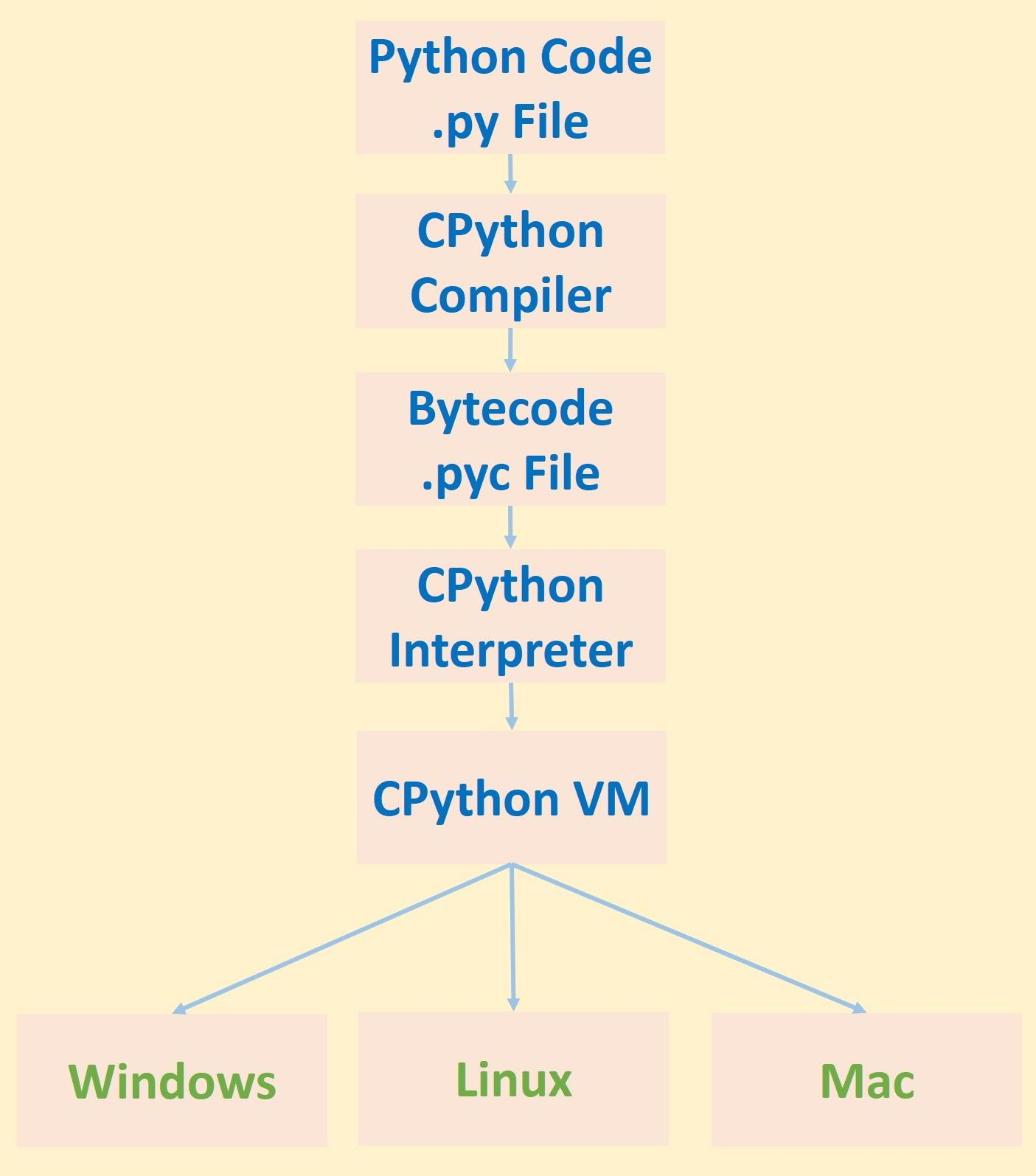
Given a Python script .py, the source code is first compiled into bytecode using the CPython compiler. The bytecode is generated and stored in a file with the extension pyc. The bytecode is then executed in a virtual environment using the CPython interpreter.
There are advantages to using a compiler to convert source code to bytecode. If a compiler is not used, the interpreter works directly on the source code and translates it line by line into machine code. The disadvantage of doing this is that some processes have to be applied to translate each line of source code into machine code, and such processes are repeated for each line. For example, syntax analysis is applied to each line independently of the other lines, and so the interpreter spends a lot of time translating the code. The compiler solves this problem because it can process all the code at once and so syntax analysis is applied only once instead of for each line of code. So the bytecode produced from the compiler is easily interpreted. Note that compiling the entire source code may not be useful in some cases, and we will see a clear example of this when discussing PyPy.
Once the bytecode is generated, it is executed by the interpreter running in the virtual machine. The virtual environment is beneficial because it decouples the CPython bytecode from the machine, thus making Python cross-platform.
Unfortunately, just using a compiler to generate bytecode is not enough to speed up CPython execution. The interpreter works by translating the code into machine code each time it is executed. So, if a line takes LX seconds to execute, executing it 10 times will cost X*10 seconds. For long-running operations, this is very costly in execution time.
Based on the CPython bugs, now let's take a look at PyPy.
Introduction to PyPy and its features
PyPy is a Python implementation similar to CPython that is both compliant and fast. “Compliant” means that PyPy is compatible with CPython, in that you can use almost all CPython commands in PyPy. As mentioned here, there are some compatibility differences. PyPy’s most powerful advantage is its speed. PyPy is much faster than CPython. We will see later some tests where PyPy performs about 7 times faster. In some cases it may even be tens or hundreds of times faster than CPython. So how does PyPy achieve its speed?
Speed
PyPy uses a just-in-time (JIT) compiler that can dramatically speed up Python scripts. The type of compilation used in CPython is ahead-of-time (AOT), meaning that all code is translated into bytecode before execution. The JIT only translates code at runtime, only when it is needed.
The source code may contain blocks of code that are not executed at all, but are still translated using the AOT compiler. This results in slower processing times. When the source code is large and contains thousands of lines, using JIT makes a big difference. With AOT, the entire source code is translated and therefore takes a lot of time. With JIT, only the required parts of the code are executed, making it much faster.
After PyPy translates a piece of code, it is cached. This means that the code is translated only once and the translation is used later. The CPython interpreter repeats the translation every time the code is executed, which is another reason why it is slow.
Effortless
PyPy is not the only way to increase the performance of Python scripts, but it is the easiest. For example, Cython can be used to speed up the assignment of C types to variables. The problem is that Cython requires the developer to manually review the source code and optimize it. This is tedious and increases in complexity as the code size increases. When using PyPy, you just run regular Python code much faster without any effort.
No stack
Standard Python uses the C stack. This stack stores the sequence of functions that are called from each other (returns). Since the stack is limited in size, you are limited in the number of function calls.
PyPy uses Stackless Python, an implementation of Python that does not use the C stack. Instead, it stores function calls on the stack alongside objects. The stack size is larger than the heap size, so you can make more function calls.
Stackless Python also supports microthreads, which are better than regular Python threads. In a stackless Python thread, you can run thousands of tasks called "tasklets," all running on a single thread.
Using tasklets allows tasks to be executed concurrently. Concurrency means that two tasks are running at the same time, sharing the same resources. One task runs for a while, then stops to make room for the second task to run. Note that this is different from parallelism, which involves running two separate but simultaneous tasks.
Using Tasklets reduces the number of threads created, thereby reducing the overhead of managing all these threads by the operating system. As a result, speeding up execution by switching between two threads takes more time than switching between two tasks.
Using Stackless Python also paved the way for continuations. Continuations allow us to save the state of a task and restore it later to continue the task. Note that Stackless Python is no different from standard Python. It just adds more functionality. Whatever is available in standard Python will also be available in Stackless Python.
After discussing the benefits of PyPy, let's talk about its limitations in the next section.
PyPy limitations
While you can use CPython on any machine and any CPU architecture, PyPy has relatively limited support.
Here are the CPU architectures supported and maintained by PyPy (source):
- x86 (IA-32) and x86_64
- ARM platforms (ARMv6 or ARMv7, with VFPv3)
- AArch64
- PowerPC 64bit, both little and big endian
- System Z (s390x)
PyPy does not work on all Linux distributions, so you should be careful to use one of the supported distributions. Running the PyPy Linux binary on an unsupported distribution will return an error. PyPy only supports one version of Python 2 and Python 3, which are PyPy 2.7 and PyPy 3.6.
If the code running in PyPy is pure Python, the speedup provided by PyPy is usually significant. However, if the code includes C extensions such as NumPy, PyPy may actually increase the time. The PyPy project is actively developed and therefore may provide better support for C extensions in the future.
PyPy is not supported by a number of popular Python frameworks, such as Kivy. Kivy allows CPython to run on all platforms, including Android and iOS. This means that PyPy cannot run on mobile devices.
Now that we have seen the advantages and limitations of PyPy, let's explain how to run PyPy on Ubuntu.
Running PyPy on Ubuntu
You can run PyPy on Mac, Linux, or Windows, but we’re going to discuss running it on Ubuntu. It’s important to note that PyPy Linux binaries are only supported on specific Linux distributions. You can check out the available PyPy binaries and their supported distributions on this page. For example, PyPy (or Python 2.7 or Python 3.6) is only supported for three versions of Ubuntu: 18.04, 16.04, and 14.04. If you have the latest version of Ubuntu as of this date (19.10), you won’t be able to run PyPy on it. Trying to run PyPy on an unsupported distribution will return this error:
PyPy binaries come as compressed files. All you need to do is unzip the file you downloaded. Inside the uncompressed folder is a folder called bin where the PyPy executable file can be found. I'm using Python 3.6 and so the file is called pypy3. For Python 2.7, it's just called pypy.
For CPython, if you want to run Python 3 from the terminal, simply enter the command python3 . To run PyPy, simply issue the command pypy3 .
As shown in the following figure, entering the pypy3 command in the terminal may return the message 'pypy3' not found. This is because the PyPy path has not been added to the PATH environment variable. The command that actually works is ./pypy3, given that the current path in the terminal is inside the PyPy bin directory. The dot . refers to the current directory and the / is added to access something in the current directory. Issuing the command ./pypy3 successfully executes Python.
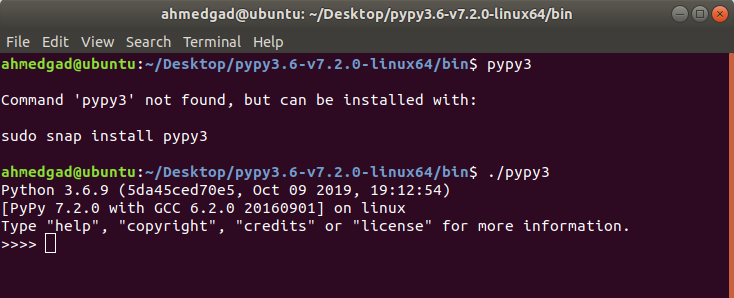
Now you can work with Python as usual, taking advantage of PyPy. For example, we can create a simple Python script that adds 1000 numbers and run it using PyPy. The code is as follows.
nums = range(1000)
sum = 0
for k in nums:
sum = sum + k
print("Sum of 1,000 numbers is : ", sum)
If this script is called test.py, you can simply run it using the following command (assuming the Python file is located inside the PyPy bin folder, which is the same location as the pypy3 command).
./pypy3 test.py
The next figure shows the result of executing the previous code.

PyPy vs. CPython runtime
To compare the execution time of PyPy and CPython for the sum of 1000 numbers, the code for measuring the time changes as follows.
import time
t1 = time.time()
nums = range(1000)
sum = 0
for k in nums:
sum = sum + k
print("Sum of 1,000 numbers is : ", sum)
t2 = time.time()
t = t2 - t1
print("Elapsed time is : ", t, " seconds")
For PyPy the time is close to 0.00045 seconds, compared to 0.0002 seconds for CPython (I ran the code on my Core i7-6500U machine at 2.5 GHz). In this case CPython takes less time than PyPy, which is to be expected since this is not really a long-running task. If the code were to add 1 million numbers instead of 1000, PyPy would eventually win. In this case it would take 0.00035 seconds for PyPy and 0.1 seconds for CPython. The advantage of PyPy is now obvious. This should give you an idea of how much slower CPython is for long-running tasks.
Result
This tutorial introduces PyPy, the fastest Python implementation. The main advantage of PyPy is its just-in-time (JIT) compilation, which caches compiled machine code to prevent it from being re-executed. PyPy's limitations are also highlighted, the main one being that it works well for pure Python code but is not efficient for C extensions.
We also saw how PyPy runs on Ubuntu and compared the execution times of both CPython and PyPy, highlighting PyPy's performance for long-running tasks. Meanwhile, CPython may still beat PyPy for short-running tasks. We will explore more comparisons between PyPy, CPython, and Cython in future articles.