
Introduction
PocketBase is a powerful and flexible backend solution that offers real-time data synchronization, built-in authentication, and a robust API, making it a great choice for a variety of applications. This tutorial provides a detailed, step-by-step guide to help you navigate the deployment process. Whether you're an experienced developer or just starting out, this guide will equip you with the knowledge and tools you need to deploy a reliable and scalable PocketBase instance for your application.
Prerequisites
Before you begin, make sure you have the following:
- 1 server with Ubuntu 24.04
- You can use the Arm64 instance to have better performance compared to traditional x86 instances.
- Root access
- Basic introduction to the Linux command line
Step 1 – Prepare your server
Use an SSH client (PuTTY or Terminal) to connect to your server:
ssh root@<your_server_ip>
Start by updating your server with the following commands:
apt update && apt upgrade -y && apt install -y unzip
Then create a user for PocketBase with this command:
adduser pocketbase
You will be asked to enter a secure password. Follow the on-screen instructions to complete the setup.
Now switch to the new user by running the following:
su - pocketbase
Step 2 – Download PocketBase
Visit the PocketBase releases page and select the latest version. Select the appropriate build for your instance – either linux_amd64 or linux_arm64. Copy the download URL and use wget to download the file.
wget <url>
To unzip the downloaded archive, use the following command:
unzip <filename>
Note: If you want to check the file name, you can list the files in the directory with:
ls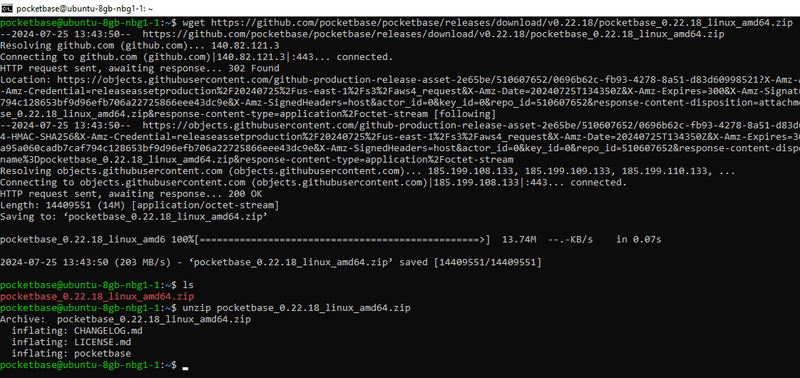
Step 3 – Configure and create a service
First, switch back to the original user by running the following:
exit
To enable the binary to connect to ports below 1024, use the following command:
setcap CAP_NET_BIND_SERVICE=+eip /home/pocketbase/pocketbase
To create a systemd service, use the following command:
bash -c 'cat <<EOF > /etc/systemd/system/pocketbase.service
[Unit]
Description=PocketBase
After=network-online.target
[Service]
User=pocketbase
WorkingDirectory=/home/pocketbase
ExecStart=/home/pocketbase/pocketbase serve --http=0.0.0.0:80
Restart=always
RestartSec=5
[Install]
WantedBy=multi-user.target
EOF
systemctl daemon-reload
systemctl enable pocketbase.service
systemctl restart pocketbase.service'
Step 4 – Create an admin account
Open PocketBase in your browser:
http://<your_server_ip>/_You will see the following page:
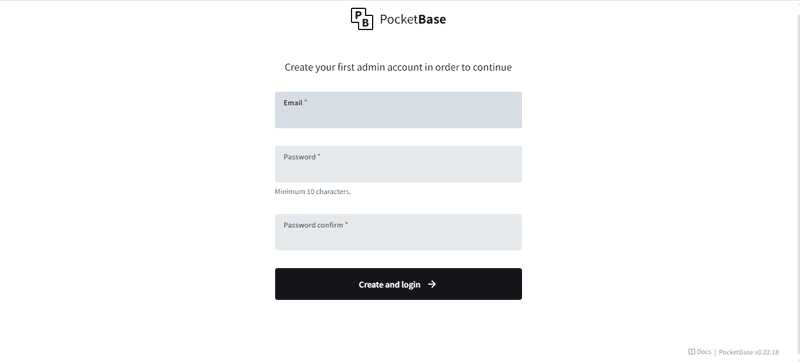
Enter your email and password in the appropriate fields. Make sure to remember your login credentials for future logins.
Then click Create and Login.
Result
Congratulations! You have successfully deployed and configured PocketBase on your server.