The future of web apps and native apps
The gap between native apps and web apps is narrowing. So let's uncover the evolving world of web apps and see how they can help us elevate our apps.
The capabilities available on websites and apps have changed dramatically since the early days of static pages. Even in recent times, we have seen significant advancements, including:
Native animations and simple flexible layouts and realistic 3D graphics and streaming videos are on the rise. In the name of "but little." But there's still a lot to be done. Especially if the web is to compete effectively with native operating systems.

Expert writers and browser engineers have been looking for features that would make the native operating system and its applications more popular. Now we see how the web is taking a stand and trying to fill the gaps in the capabilities of the operating system. Basically, this has led to a focus on a handful of features, some of which are easy to implement and others not so much. The following titles are not an exhaustive list, but they cover the main points.
Native programs include:
- Link: It is possible for you to be redirected to the web application by a given URL.
- Reactive: With tools like media queries, you can create complex layouts that work across a variety of formats (orientation, resolution, screen size, etc.). In fact, the default web layout model is inherently responsive, which makes this especially good for text manipulation.
- Data-driven: With HTML, you can provide meaning and structure, and the web is best at processing data.
- Advanced: You can design web applications to give modern browsers the latest features, while still providing an acceptable experience in older browsers.
- Security: The web offers features that can keep applications secure, using the single-origin security model and HTTPS. Thanks to a program like Let's Encrypt Securing web applications has become even easier.
However, the web also has certain advantages, such as:
- Installation capability: App availability on the device and full integration with the operating system for a good feel – even a little better if there was a small icon for the apps on the home screen and the apps could open full screen or in a small window. These are simple things. Right?
- Discoverability: US web nerds are largely loath to have a closed app store. But we can't deny that they've improved the ways they find apps - although some argue that even the best closed app stores are failing due to overcrowding.
- Being offline: Web connectivity is everywhere in the world. But you can't rely on 100%. But you suffer from not being able to use an app because you're offline and there's no other way.
- Charm: Once you get a user to use your app, you’re halfway there. But how do you keep them engaged and updated? Native app developers have long enjoyed the availability of push notifications to keep users informed.
- Quick: Many people believe that native code performs better than web code, but as you will read later, this gap is rapidly narrowing.
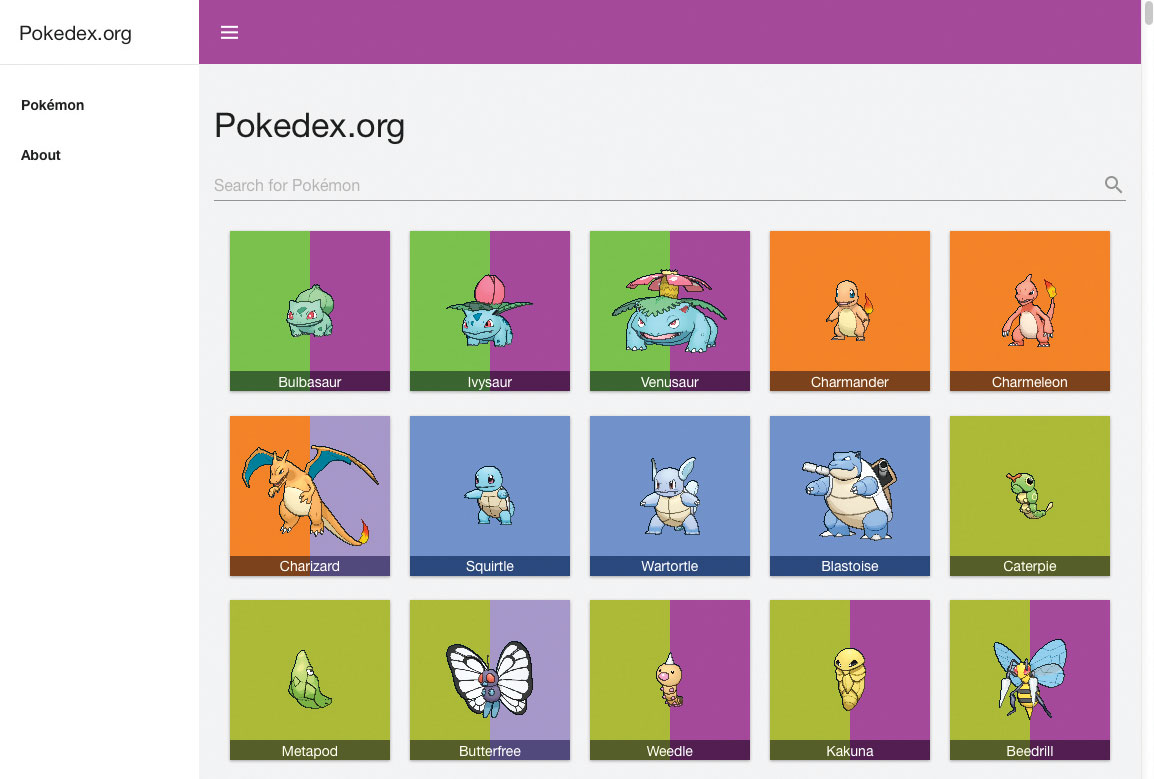
The pokedex.org site is the best example of an advanced web application, while also serving as a fun hobby.
√We want to design the web to allow access to useful applications in native apps, but not at the expense of the basics that have already been tested. This movement is called the Web App Revolution, which is being led by companies like Mozilla and Google They are supported.
√We'll look at the new technologies that enable such advancements later, but first, let's get a little closer to the web so we can get ahead of native apps.
√Note: What are some interesting things that native operating systems are working on to bridge the gap between themselves and the web, on the other hand? For example, the Rube Goldberg-esque initiative that allowed for deeper links.
What was before
It's important to go offline first.
Experienced fans want to build web apps that work offline and connect to the internet by default only for updates.
Apps with native capabilities aren't a new concept at all. To begin with, there were plenty of "web" packages, app templates that appeared in various places - the Chrome app, for example - that allowed for the installation of approved packages on the device for use offline, as well as allowing access to hardware, etc.
We've come across the term "hybrid apps," for example Cordova and Electron. These allow developers to write apps using web technologies, and then port them to native apps that run on iOS and Android. Such apps are very popular. But they require multiple versions of the same app to be built and distributed, and they have limitations on the functionality that such apps can support. "Write once, run everywhere" is not entirely true, as we all know.
First of all, it goes without saying that single-page applications are also worth mentioning. A single HTML page can serve as the main page of the application and load different views dynamically using XHR (or similar), with the aim of making web applications faster and more responsive. This type of application model is supported by popular frameworks such as Ember. JS and AngularJS, along with offline-first, form the basis of a large part of advanced web applications.

Installation and setup capabilities
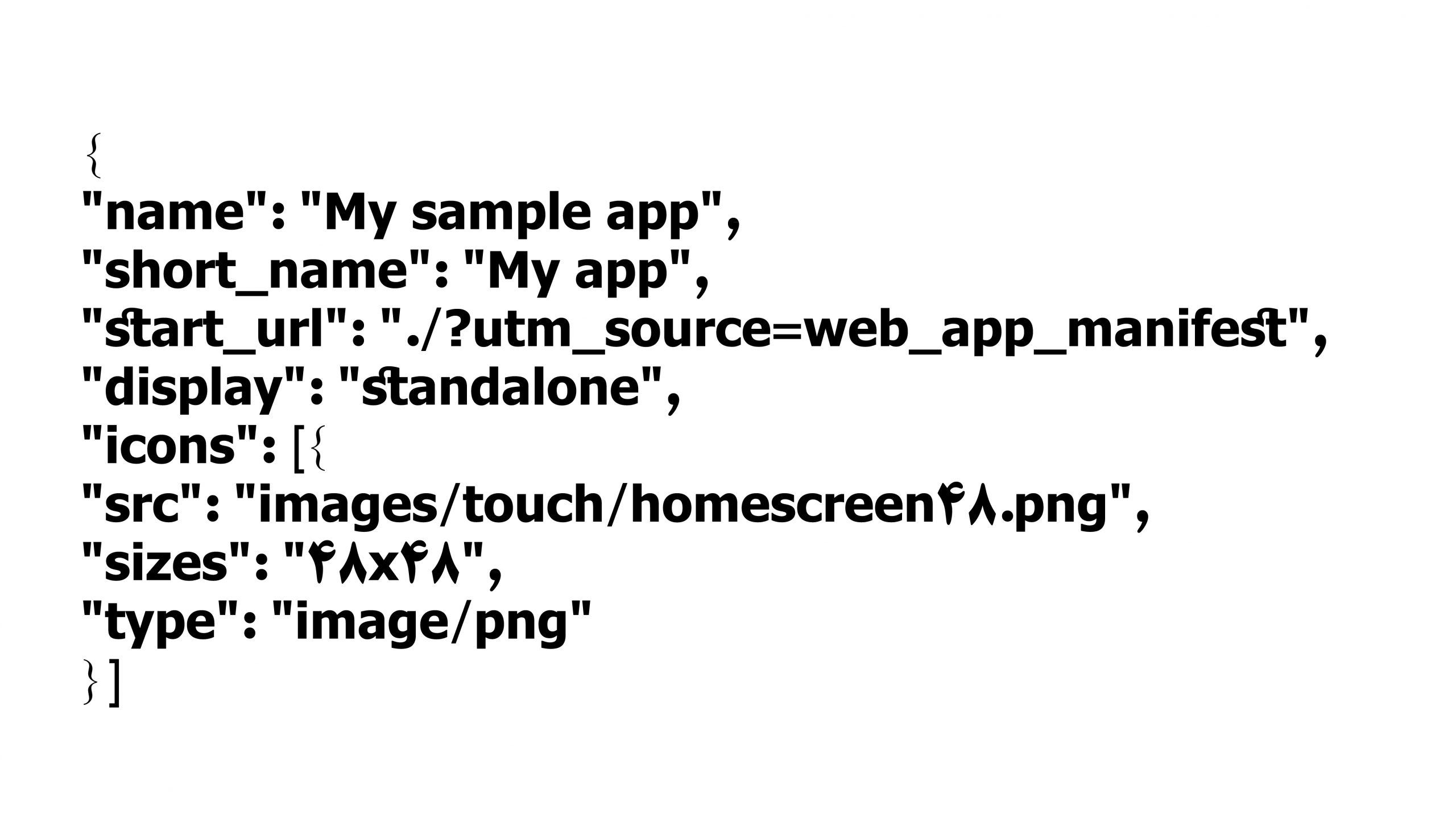
In the first part of Advanced Web Apps, we'll look at installation and setup. This allows you to use the web app skin, which creates a JSON file containing information about the web app such as icons, name, and display mode to use when opening the app:
Such code can be used to further integrate the application with the main operating system (icon on the home screen, opening full screen instead of the browser, etc.), and also provides better findability in the application list - for example, it appears in search engine results.
This information is already used in Opera and Chrome on phones for cross-platform integration, with Firefox support to follow soon.

Offline
And fast forward to the present, we have service apps; a new technology in Firefox, Chrome, and Opera that allows developers to write offline apps in a way that works like AppCache and a lot more besides. This is the lowest level of API, and therefore a much more complex composition. But it does give developers more power over what they want their services to do.
Asset Storage, on the other hand, is a different ball game. For a while, it seemed like something like AppCache was going to solve the problem, but it was too much of an assumption that there was a way to launch an app, and developers didn't have enough control over what was happening.
The problem of the offline web has been going on for an incredibly long time, considering how simple it seems at first glance. The problem is that implementing an effective offline technology set is not easy. Storing a large amount of data offline is not a big deal. Modern browsers have had APIs (application program interfaces) like IndexedDB for some time, and support for Web Storage has been around since IE8.

A server application is a piece of JavaScript written in a separate file that runs in a specific thread. It acts as a proxy server between the Internet and your applications (and the browser). When a request is made for something, the server application can intercept it and customize it before it is sent to the browser for use.
To use the service program, you must first run () navigator. serviceWorker. register Register it on the home page.
navigator.serviceWorker.register(‘'sw.js'’)
.then(function(reg) {
// Do something to initialize app
});
And then installed it using the installer in the utilities section. Sometimes these essential files are stored by all the applications that use the Cache API (which happens to be used independently from the communication applications).
this.addEventListener(‘'install'’, function(event) {
event.waitUntil(
caches.open(‘'v1'’).then(function(cache) {
return cache.addAll([
‘'/sw-test/'’,
‘'/sw-test/index.html'’,
‘'/sw-test/style.css'’,
‘'/sw-test/app.js'’
]);
})
);
});
And after an event listener response in the service application sends code in response to requests that occur, allowing developers to customize the result in the response. So a developer can request files that haven't changed much (like the UI skin) to be stored in the installation, and then use the versions stored in the repository (instead of the online version) when needed. Boom, offline applications.
this.addEventListener(‘'fetch'’, function(event) {
var response;
event.respondWith(caches.match(event.request).catch(
// write code to handle the case where the requested file is
// isn't already stored offline in the cache
);
});
It should be noted that service applications only work with HTTPS communication.
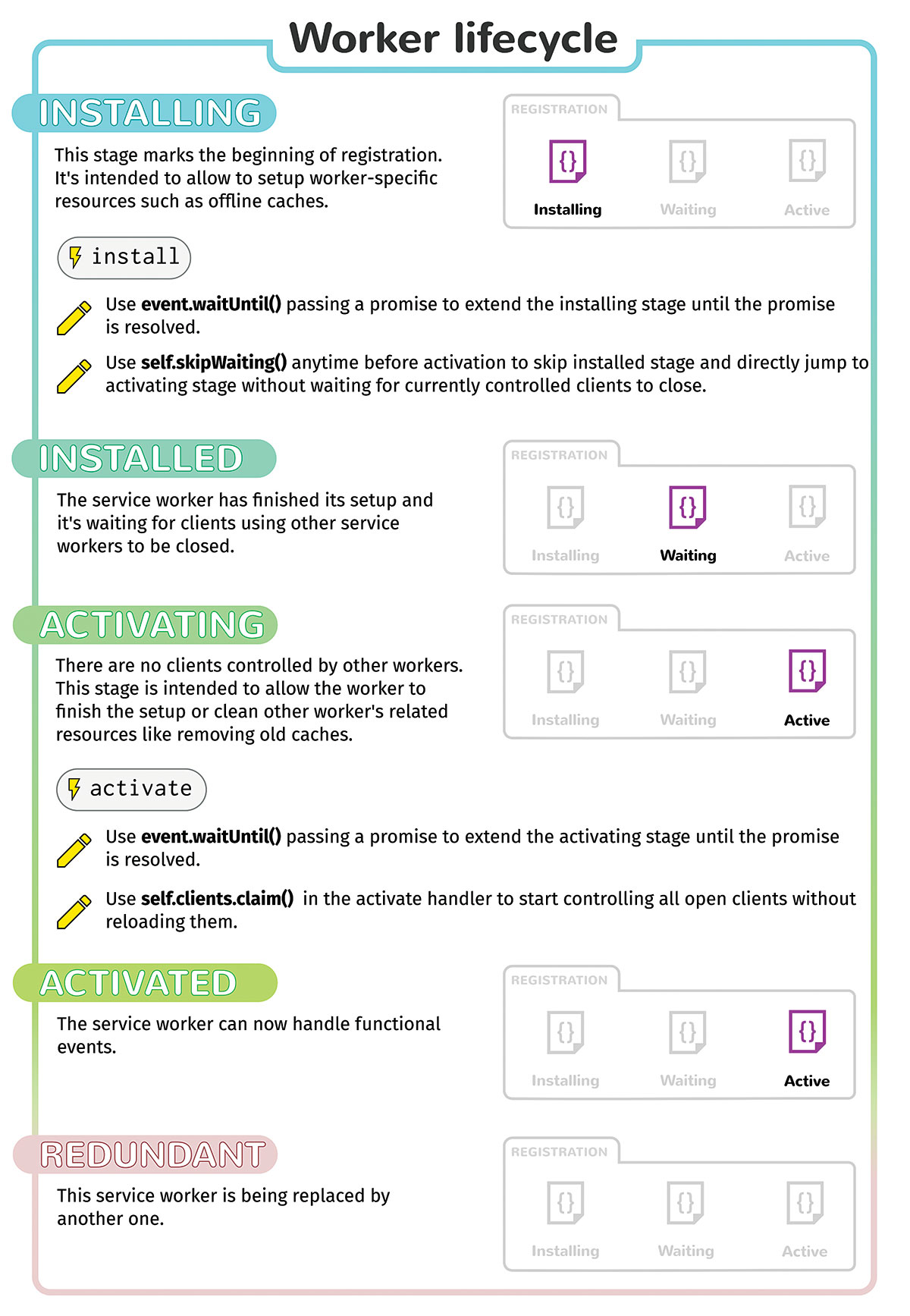
↑ The diagram above shows the installation cycle of a service application ↑
Re-engage with the user
Native operating systems have long relied on push notifications—the ability for a server to send a message to a client system to notify the user of changes—even when the application is closed. Maybe a news app wants to push a new update to the user? Or maybe your Pokémon game is tired and needs attention? We now have these capabilities for web applications as well.
To use this program, as explained before, a service program must be installed and activated on the programs page. After that, it can be used by subscribing to the program. You can use the formula () ServiceWorkerRegistration.pushManager.subscribe Use to do the job:
navigator.serviceWorker.ready.then(function(reg) {
reg.pushManager.subscribe({userVisibleOnly: true})
.then(function(subscription) {
// Update UI, etc. in light of subscription
// Update status to subscribe current user on server
var endpoint = subscription.endpoint;
var key = subscription.getKey(‘'p256dh'’);
updateStatus(endpoint,key,‘'subscribe'’);
})
});
This method sends a type of collateral that is used to solve the sharing problem. It has an endpoint property (which contains a unique URL that points to the server), and a method getKey(), Which is used to generate a public key for encryption purposes. You need permission from both of them, which then sends the results to the application server.
To send an alert message to the server, make a request to the endpoint address. This will send a message from the server to the service applications. If you like, you can also send data along with the message, this must be done using an encryption key. Data-based alert messages only work on Firefox, but other browsers shouldn't be too far behind.
The service application listens for an alert message using a push event handler. Whenever an alert event is sent, you can access it using the event object's data property. You can then respond to the message in any way you want—for example, by sending a news item, or by sending a message to the home page that updates your application in any way.
self.addEventListener(‘'push'’, function(e) {
var obj = e.data.json();
// Respond to the push message in some way
// eg a notification or channel message
});
Note: Many of the technology service families (alerts, etc.) enjoy reasonable support in Chrome and Firefox, but other browsers are taking them into consideration. Alert data only works in Firefox at the time of writing.
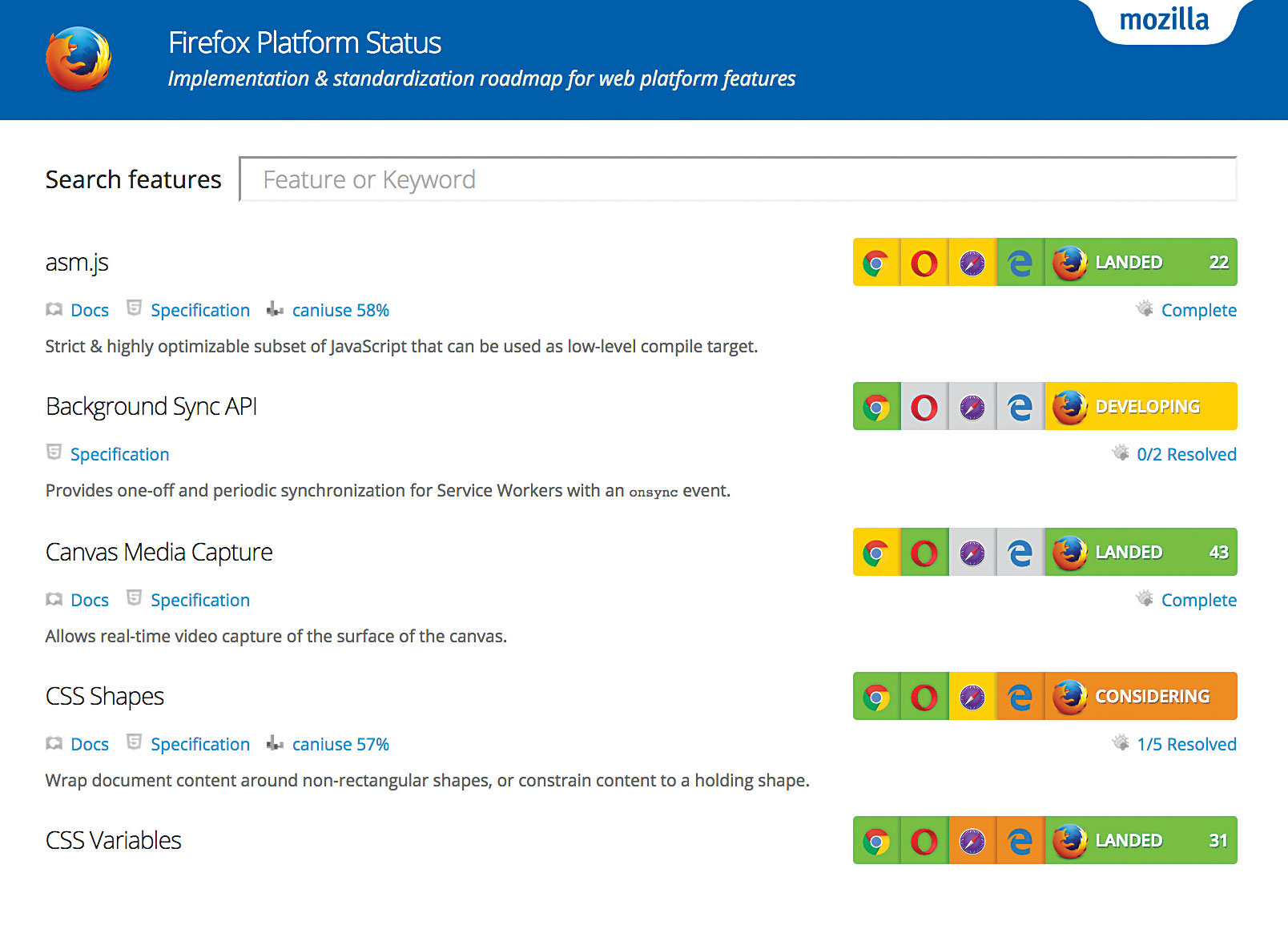
This program from Mozilla provides information on progress in implementing modern web application interfaces in browsers.
Performance
Performance has long been a sore point between web apps and native apps, with native developers abandoning the web's performance capabilities. But the gap has narrowed considerably in recent days, with much faster Java engines in browsers, and faster code within the web for running things like animation and 3D graphics, which can increasingly take advantage of the available GPU power.
Additionally, we are able to convert native application code (such as C++) to Java using technologies such as Emscripten. When we talk about Java here, we are essentially talking about asm.js, a highly optimized subset of Java that can take advantage of AOT compilation techniques for near-native performance. It has become so popular that it is supported not only in Firefox but also in Chrome and Edge, and the web has added asm.js as a publishing target for the popular 3D engines Unity and Unreal.
And the next generation is coming – some browser vendors have partnerships to set up and implement WebAssembly, which will do a similar thing to Emcscripten. But with faster, better standards, and higher performance.
This is used instead of (asm.js) with wasm format, since it has better settings, we should be able to rely on compilers producing valid wasm output and browsers should run it with consistent performance, regardless of which compiler produced it.
Result
As you can see, the web is evolving, with some exciting new technologies designed to address some of the remaining shortcomings of our beloved platforms that have traditionally suffered, though the performance is even better than the hype. That allows web apps to stand proudly alongside native apps. If we don't lose sight of what made the web great to begin with.