
Introduction
The TypeScript programming language has many advantages over JavaScript for developers. TypeScript provides additional capabilities so you can build more complex interactive applications and websites with fewer bugs.
TypeScript also has a large ecosystem of developer tools that offer inline documentation and live code review, making it easier to spot coding errors as you work.
This article explains what TypeScript is and how it relates to JavaScript, and provides resources to help you get started building frontend and backend applications.
What is TypeScript?
TypeScript is a programming language that adds additional functionality to JavaScript.
JavaScript was never intended to drive complex front-end and backend applications. It was originally designed to add simple interactivity to websites. For example, to create clickable buttons and animate drop-down menus.
However, JavaScript became popular among developers who saw ways to use it beyond this, which led to some problems: the language was too forgiving. It was too easy to make programming mistakes or misuse features that would later break an application, and JavaScript lacked many of the features of other languages. TypeScript was developed to address these issues while being compatible with existing JavaScript environments.
TypeScript is a statically typed language and a superset of JavaScript that builds on the existing syntax and functionality of JavaScript. This means that you can use JavaScript in your TypeScript code, but you cannot use TypeScript in your JavaScript code because code written in TypeScript uses features and syntax that are not available in JavaScript.
TypeScript must be compiled to JavaScript to run in web browsers and environments like Node.js (transpired is another term because it is not translated into a low-level language). When TypeScript code is compiled to JavaScript, the resulting JavaScript code is not intended to be edited directly.
The workflow for building TypeScript applications is to write them in TypeScript, compile them to JavaScript, and then deploy them. While this extra step may seem like unnecessary extra complexity, it's there for a very good reason: If TypeScript were a completely new language, it wouldn't be worth considering, but because it compiles JavaScript so it can run on existing systems, it's become widely accepted.
The file extension for TypeScript is .ts. Below is a sample file called index.ts with some basic TypeScript code:
let message: string = "Hello, World!";
function greeting () {
console.log(message);
}
greeting();
Note that while the syntax is very similar to JavaScript, something different is visible in this example: the message variable is followed by a colon (:) and its type – in this case TypeScript – allows us to specify that the message must be a string, and cannot take a value of a different type.
Top Features and Benefits of TypeScript for Developers
TypeScript is named so because its main feature is the introduction of type safety to JavaScript. In the example above, a string type is applied to the message variable, so a numeric value or any other type cannot be used there. This may seem restrictive, but it is actually a benefit for developers.
Type safety and compile-time checks reduce programming mistakes
Consider this scenario: you take values from two HTML text inputs and want to add them. JavaScript reads these values as strings (it's a text box!). What you end up with is this:
let a = "2"; // Assuming the value has been read from a text input
let b = "5";
console.log(a + b); // Result is "25"
This code runs without any warnings or errors, and the values in the text boxes are treated as strings, meaning that instead of being added using arithmetic operations, they are concatenated, resulting in the unwanted result of "25" instead of 7. If you're building a business tool and you want to add some monetary value together, this can be really bad - you're overcharging your customer!
This shows why type safety is important. Below, the type of variables added is applied by adding a type to them:
let a: number = "2";
let b: number = "2";
console.log(a + b);
If you try to compile and run this code, it won't work – instead you'll get an error:
Type 'string' is not assignable to type 'number'.
This tells you that you mistakenly tried to assign a string value to a numeric variable so you can fix it – for example, by explicitly converting the string to a number. TypeScript makes debugging your program easier and more reliable for your users by preventing your code from even compiling and running if there are typos.
When working in TypeScript, you don't need to specify the type of a variable (although you usually should): type inference allows you to declare and use variables without specifying a type, and TypeScript infers the type based on the value and usage. This is useful when importing untyped JavaScript code for use in TypeScript projects.
If you want to play with this for yourself, TypeScript Playground lets you write and test TypeScript code directly in your browser without the need to compile.
Custom types, classes, and interfaces keep your data consistent.
TypeScript extends JavaScript's support for object-oriented programming with support for your own custom types, as well as improvements to classes, interfaces, and inheritance.
Building your own object types and interfaces allows you to model your data in TypeScript to ensure that your data is processed and stored correctly.
Classes and inheritance enable clean code and DRY principles, keeping your codebase much more organized than traditional JavaScript.
Enums and literal types make your code easier to understand
Enums make your code more readable and convenient by naming values that might otherwise be ambiguous.
For example, suppose you store the status of an order in your database as a numeric value to save space and make searching faster. Instead of "pending," "paid," and "shipped," you might store these values as the numbers 0, 1, and 2, respectively.
The side effect is that your code becomes confusing because the numbers themselves don't describe much. You might forget which number corresponds to which condition and use the wrong one. Enums offer a convenient solution:
enum OrderStatus {
pending,
paid,
shipped,
}
In the above list, "pending" has the value 0 (enums, like other indexes in programming, start counting the position of items from zero), "paid" has the value 1, and "sent" has the value 2. When using an enum, you refer to its values by name and the index value is returned:
console.log(OrderStatus.paid); // Will output 1
Literal types and unions assign specific values to variables. For example, you might have a function that only expects to receive the value "cat" or "dog":
function myFunction(pet: "cat" | "dog") {
console.log(pet);
}
If your code passes values other than "cat" or "dog" to this function, an error will be raised. This helps ensure that more problems are found during development: you can write functions that expect specific input, knowing that if a bug is introduced that sends them an unexpected value, your program will not compile.
How to install TypeScript and use the TypeScript compiler
TypeScript code needs to be compiled into JavaScript so that it can be run in web browsers and Node.js, and for that you need to install the TypeScript compiler.
You can install TypeScript globally using the following npm command.
npm install -g typescript
Once installed, you can run the tsc TypeScript compile command from anywhere in your terminal using npx:
tsc index.ts
The above command compiles the TypeScript file index.ts and outputs a compiled JavaScript file named index.js.
How to write a program in TypeScript
TypeScript shines when building complex, multi-page applications and websites. Most developers don't use it for basic things like adding interactivity to individual web pages, but they do use it to build large applications with React or Angular.
Many developers use code editors that support TypeScript integration so they can take advantage of code completion, inline documentation, and error highlighting to streamline their development and debugging processes.
Can I use my existing JavaScript code?
Yes! TypeScript is compatible with JavaScript. You can import your old JavaScript code and continue to use it in your TypeScript projects, and modify it over time to take advantage of new TypeScript functionality.
Finish building with TypeScript for the browser
React is a library that helps you create user interfaces for your front-end applications. It provides you with the foundation to build reusable components, making your application development modular and simple. It also allows you to create dynamic pages that the user can interact with by showing, hiding, moving, and changing the appearance of the content on the page. React applications can be written in TypeScript: this combination is a popular and powerful toolchain for front-end developers.
Angular is a complete framework that uses TypeScript to build its components. It goes beyond React: in addition to providing tools for building user interfaces, it also provides a framework for a complete application. Angular's conceptual approach allows developers to build faster, provided that the concept of their application fits the Angular architecture.
Both React and Angular can be used to build TypeScript apps for Ionic and Electron. Ionic lets you build mobile apps for iOS and Android using TypeScript, and Electron lets you embed your web apps into desktop apps for Windows, Linux, and MacOS.
Deploying TypeScript Backends on the Server
TypeScript is not limited to building front-end applications. It can also be used with Node.js to develop back-end services and command-line applications.
You can also use TypeScript with the Fastify web framework or use a TypeScript-specific framework like Nest to create type-safe APIs.
TypeScript and GraphQL
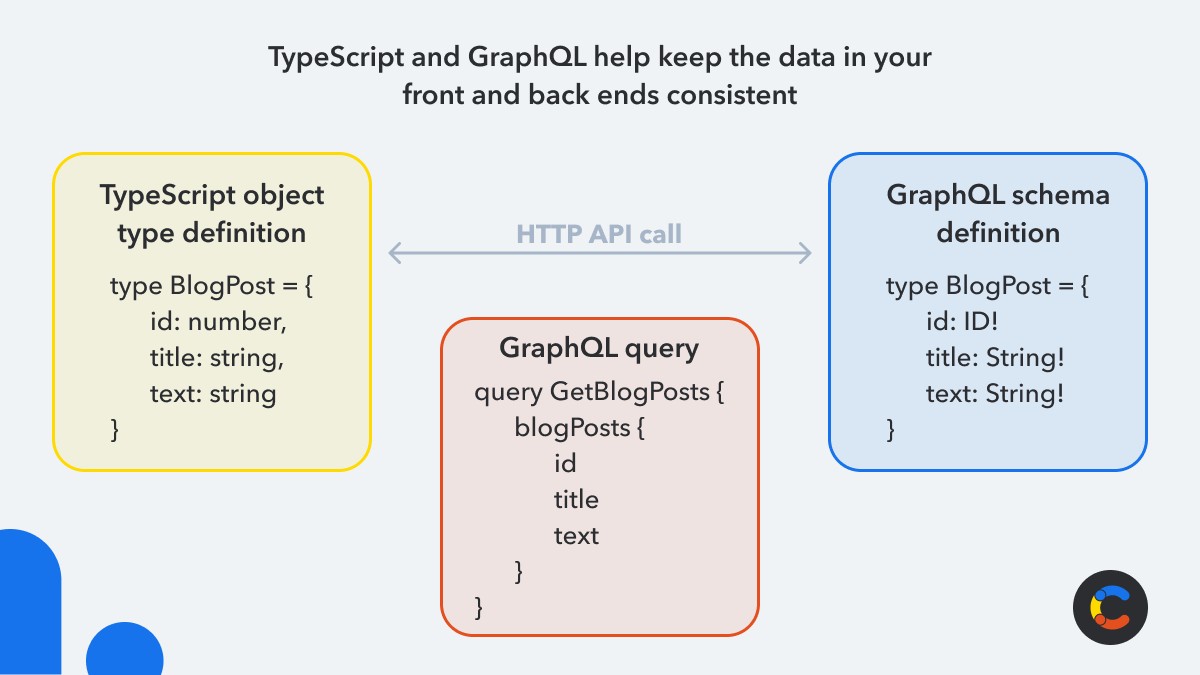
GraphQL is a query language for searching and retrieving data from APIs. Like TypeScript, it is typed, so it provides structured and consistent data. By using services that support GraphQL to implement it in your backends, and matching its types to your TypeScript code, you can greatly improve the quality of your applications by ensuring that all data modeled on your backend services is correctly reflected in your frontends, and that all data collected on frontends is stored correctly when uploaded.
If you use Contentful to manage your composable content, our community members have created apps and tools that help generate type declarations for your content types and synchronize TypeScript with your content model.