Introduction
The Pub/Sub pattern is a versatile one-way messaging pattern in which a publisher produces data/messages and subscribers subscribe to receive specific types of messages. It can be implemented using a peer-to-peer architecture or a message broker to mediate communications.
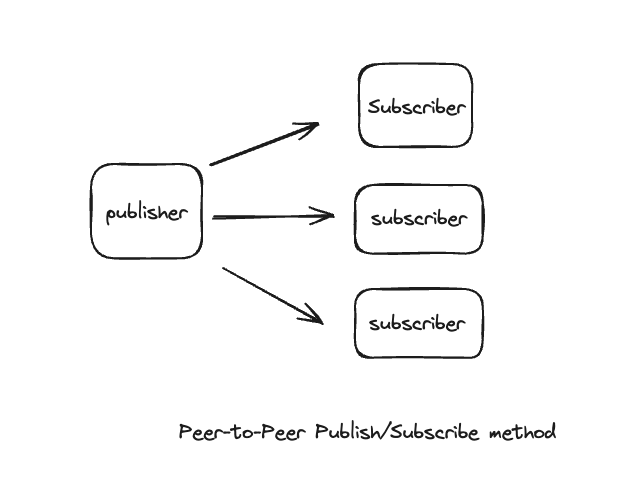
The image above shows the Peer-to-Peer Pub/Sub model, where a publisher sends messages directly to subscribers without intermediaries. Subscribers need to know the publisher's address or endpoint to receive the message.
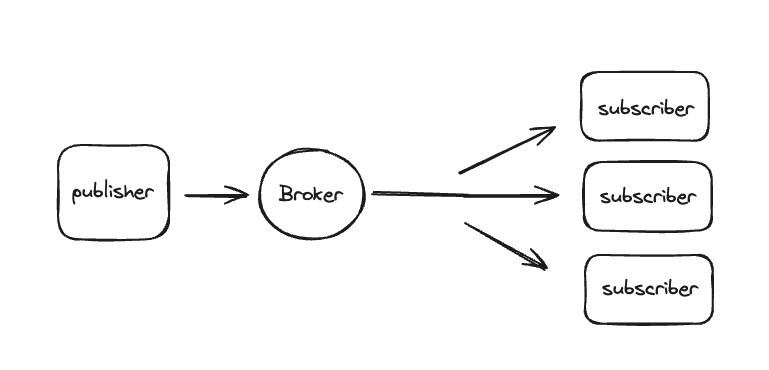
In the image above, the Pub/Sub model uses a message broker as a central hub for sending messages between publishers and subscribers. The broker mediates the message exchange and distributes messages from publishers to subscribers. Subscriber nodes subscribe directly to the broker instead of the publisher. The presence of a broker improves the isolation of the system nodes because both the publisher and subscribers interact only with the broker. In this tutorial, you will build a real-time chat application to further demonstrate this pattern.
Prerequisites
- Node.js (version >= 12) is installed on your operating system.
- A code editor like VSCode
- Redis is installed on your machine.
- Basic understanding of HTML, DOM, VanillaJS, and WebSocket.
Step 1 – Server-side implementation
To start running the server side, we initialize a basic Nodejs application using the initial command:
npm init -yThe above command creates a default package.json file.
Next, we install the WebSocket (ws) dependency package, which is required throughout the entire course of this build:
npm install wsThe server-side implementation will be a simple server-side chat application. We will follow the following workflow:
- Set up a server
- Read the HTML file to render it in the browser
- Set up a WebSocket connection.
Server setup
Create a file called app.js in your directory and put the following code inside it:
const http = require("http");
const server = http.createServer((req, res) => {
res.end("Hello Chat App");
});
const PORT = 3459;
server.listen(PORT, () => {
console.log(`Server up and running on port ${PORT}`);
});
Method createServer In the module http Domestic Node.js It will be used to start the server. The port on which the server should listen for requests is set, and the listen method on the created server instance is called to listen for incoming requests on the specified port.
Order node app.js Run in your terminal and you should get a response like this:
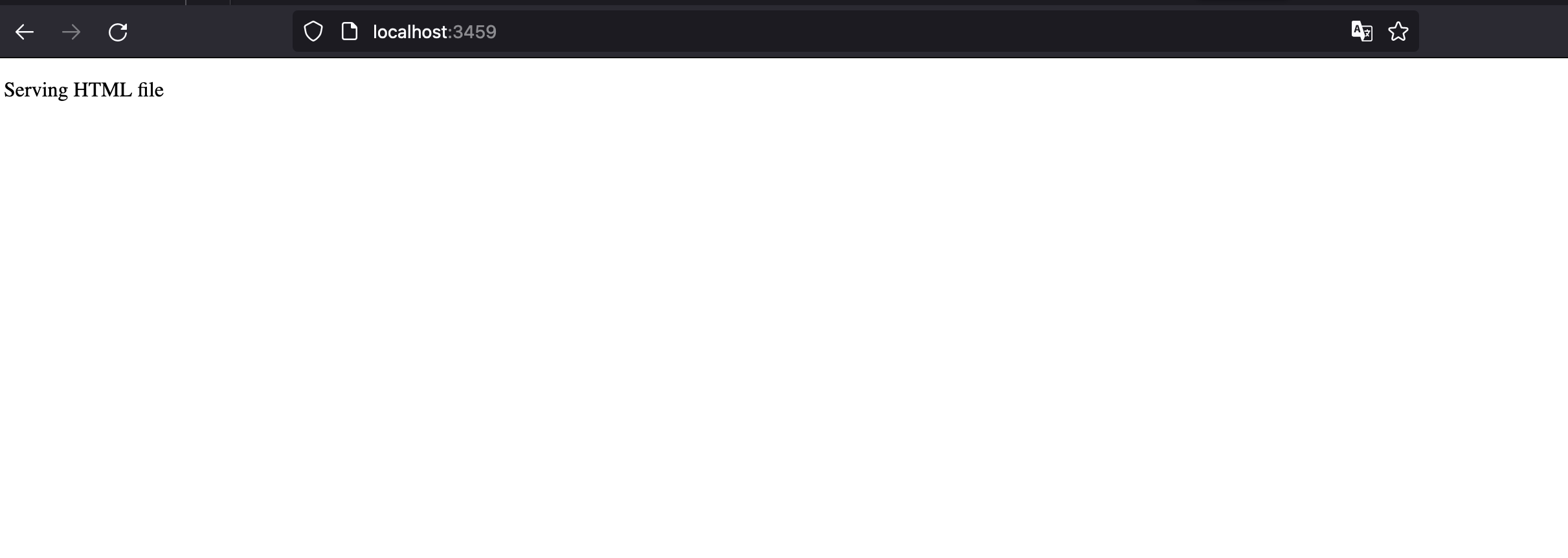
OutputServer is up and running on port 3459If you request this port in your browser, you should get something like this as your response:

Read the HTML file to render it in the browser

Create a file called index.html in the main folder and copy the following code:
<!DOCTYPE html>
<html lang="en">
<head>
<meta charset="UTF-8" />
<meta name="viewport" content="width=device-width, initial-scale=1.0" />
<title>Document</title>
</head>
<body>
<p>Serving HTML file</p>
</body>
</html>
This is a basic html file that renders Hello. Now, we need to read this file and render it as a response whenever an HTTP request is sent to our server.
// app.js
const server = http.createServer((req, res) => {
const htmlFilePath = path.join(__dirname, "index.html");
fs.readFile(htmlFilePath, (err, data) => {
if (err) {
res.writeHead(500);
res.end("Error occured while reading file");
}
res.writeHead(200, { "Content-Type": "text/html" });
res.end(data);
});
});
Here, we use the internal path module and the function join We use it to join path segments together. Then we use the function readFile To read the file index.html Used asynchronously. Requires two arguments: the path to the file to read and a readback. Status code 500 A response header is sent and an error message is sent to the client. If the data is read successfully, a success status code is returned. 200 We send the response header and send the response data to the client, which in this case is the file content. If no encoding is specified, such as UTF-8 encoding, the raw buffer is returned. Otherwise, the file HTML It is returned.
Make a request to the server in your browser, and you should have this:
Setting up a WebSocket connection
// app.js
const webSocketServer = new WebSocket.Server({ server });
webSocketServer.on("connection", (client) => {
console.log("successfully connected to the client");
client.on("message", (streamMessage) => {
console.log("message", streamMessage);
distributeClientMessages(streamMessage);
});
});
const distributeClientMessages = (message) => {
for (const client of webSocketServer.clients) {
if (client.readyState === WebSocket.OPEN) {
client.send(message);
}
}
};
In the previous line of code, we created a new WebSocket server called webSocketServer We create and send it to the server. HTTP We connect to our existing one. This allows us to handle both standard HTTP requests and WebSocket connections on a single port 3459.
The on() connection event is fired when a successful WebSocket connection is established. The client in the function callback A WebSocket connection object represents a connection to a client. It is used to send and receive messages and listen for events such as client messages.
The distributeClientMessages function is used here to send incoming messages to all connected clients. It takes a message argument and iterates over the clients connected to our server. It then checks the connection state of each client (readyState === WebSocket.OPEN). This is to ensure that the server only sends messages to clients that have open connections. If the client connection is open, the server sends the message to that client using the client.send(message) method.
Step 2 – Client-side implementation
To run the client side, the file index.html We change ourselves a little.
<!DOCTYPE html>
<html lang="en">
<head>
<meta charset="UTF-8" />
<meta name="viewport" content="width=device-width, initial-scale=1.0" />
<title>Document</title>
</head>
<body>
<p>Pub/Sub Pattern with Chat Messaging</p>
<div id="messageContainer"></div>
<form id="messageForm">
<form id="messageForm">
<input
type="text"
id="messageText"
placeholder="Send a message"
style="
padding: 10px;
margin: 5px;
border-radius: 5px;
border: 1px solid #ccc;
outline: none;
"
onfocus="this.style.borderColor='#007bff';"
onblur="this.style.borderColor='#ccc';"
/>
<input
type="button"
value="Send Message"
style="
padding: 10px;
margin: 5px;
border-radius: 5px;
background-color: #007bff;
color: white;
border: none;
cursor: pointer;
"
onmouseover="this.style.backgroundColor='#0056b3';"
onmouseout="this.style.backgroundColor='#007bff';"
/>
</form>
</form>
<script>
const url = window.location.host;
const socket = new WebSocket(`ws://${url}`);
</script>
</body>
</html>
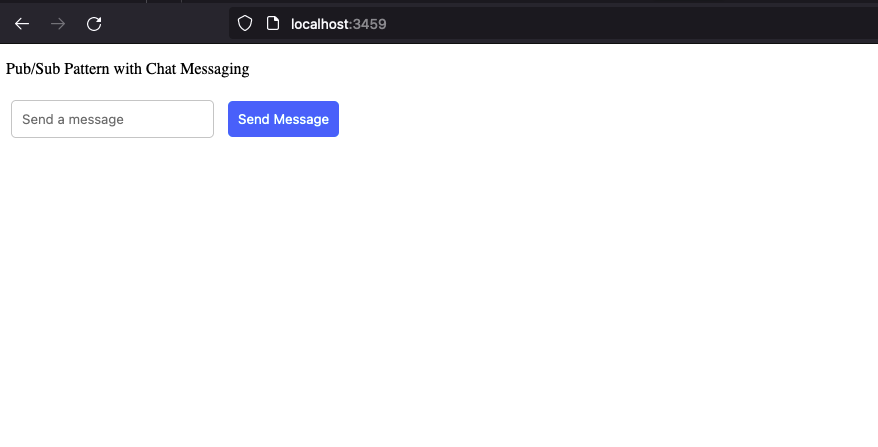
In this code snippet, we have added a form element that has an input and a button to send a message. WebSocket connections are initiated by clients, and to communicate with a WebSocket server that we have initially set up, we need to create an instance of the WebSocket object that specifies ws://url, which specifies the server we want to use. The URL variable, when you log in, will contain the URL connecting to port 3459, which is where our server is listening.
// app.js
console.log("url", url); // localhost:3459
console.log("socket", socket); // { url: "ws://localhost:3459/", readyState: 0, bufferedAmount: 0, onopen: null, onerror: null, onclose: null, extensions: "", protocol: "", onmessage: null, binaryType: "blob" }
So, when you make a request to the server in your browser, you should see this:
Let's upgrade our script so that we can send messages from the client to the server and receive messages from the server.
// index.html
<script>
const url = window.location.host;
const socket = new WebSocket(`ws://${url}`);
const messageContainer = document.getElementById("messageContainer");
socket.onmessage = function (eventMessage) {
eventMessage.data.text().then((text) => {
const messageContent = document.createElement("p");
messageContent.innerHTML = text;
document
.getElementById("messageContainer")
.appendChild(messageContent);
});
};
const form = document.getElementById("messageForm");
form.addEventListener("submit", (event) => {
event.preventDefault();
const message = document.getElementById("messageText").value;
socket.send(message);
document.getElementById("messageText").value = "";
});
</script>
As mentioned earlier, we retrieve the URL that sends a request to our server from the client (browser) and create a new WebSocket object instance with the URL. Then, by clicking the button Send Message We create an event on the form element. The text entered by the user in the UI is extracted from the input element and the send method on the socket instance is called to send the message to the server.
Event onmessage Called on the socket object, it is fired when a message is received from the server. It is used to update the user interface of a received message. Parameter eventMessage In function callback It has the data (message) sent from the server, but returned as a Blob. The text() method is then used on the Blob data, which returns a promise and is resolved using then() to get the actual text from the server.
Let's test what we have. Start the server by running
node app.jsThen, open two different browser tabs, http://localhost:3459/ Open and try sending messages between tabs to test:
Step 3 – Scale the application
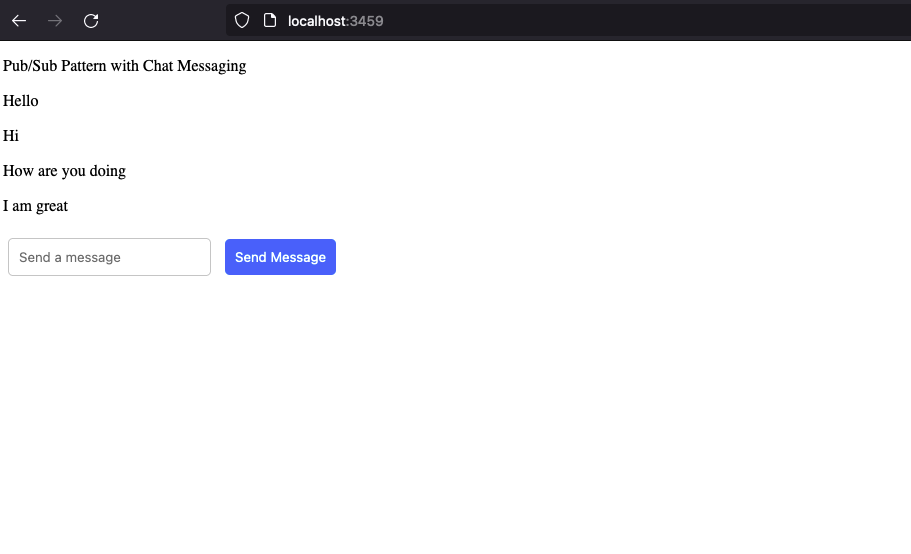
Let's say our application starts to grow, and we try to scale it by having multiple instances of our chat server. What we want to achieve is that two different users connected to two different servers should be able to send text messages to each other successfully. Right now we only have one server, and if we request another server, for example http://localhost:3460/, server messages on port 3459 We will not have. That is, only users connected to 3460 They can chat with themselves. The current implementation works in such a way that when a chat message is sent on our running server instance, the message is distributed locally only to clients connected to that particular server, as shown when http://localhost:3459/ We open it on two different browsers. Now, let's see how we can integrate two different servers so they can talk to each other.
Step 4 – Redis as a Message Broker
Redis is a fast and flexible in-memory data structure store. It is often used as a database or a cache server to store data. In addition, it can be used to implement a centralized Pub/Sub message exchange pattern. The speed and flexibility of Redis have made it a very popular choice for sharing data in a distributed system.
The goal here is to integrate our chat servers using Redis as a message broker. Each server instance publishes every message received from the client (browser) to the message broker simultaneously. The message broker subscribes to every message sent from the server instances.
Let's file app.js Let's change ourselves:
//app.js
const http = require("http");
const fs = require("fs");
const path = require("path");
const WebSocket = require("ws");
const Redis = require("ioredis");
const redisPublisher = new Redis();
const redisSubscriber = new Redis();
const server = http.createServer((req, res) => {
const htmlFilePath = path.join(__dirname, "index.html");
fs.readFile(htmlFilePath, (err, data) => {
if (err) {
res.writeHead(500);
res.end("Error occured while reading file");
}
res.writeHead(200, { "Content-Type": "text/html" });
res.end(data);
});
});
const webSocketServer = new WebSocket.Server({ server });
webSocketServer.on("connection", (client) => {
console.log("succesfully connected to the client");
client.on("message", (streamMessage) => {
redisPublisher.publish("chat_messages", streamMessage);
});
});
redisSubscriber.subscribe("chat_messages");
console.log("sub", redisSubscriber.subscribe("messages"));
redisSubscriber.on("message", (channel, message) => {
console.log("redis", channel, message);
for (const client of webSocketServer.clients) {
if (client.readyState === WebSocket.OPEN) {
client.send(message);
}
}
});
const PORT = process.argv[2] || 3459;
server.listen(PORT, () => {
console.log(`Server up and running on port ${PORT}`);
});
Here, we use publishing/sharing capabilities. Redis We use two different connection instances, one for publishing messages and one for subscribing to a channel. When a message is sent from the client, it is published to a Redis channel called redisPublisher using the publisher method on the redisPublisher instance. ""chat_messages"" We publish. The subscribe method on the redisSubscribe instance is called to subscribe to the same channel as chat_message. Whenever a message is published to this channel, the redisSubscriber.on event listener is triggered. This event listener is repeated on all currently connected WebSocket clients and sends the received message to each client. This is to ensure that when a user sends a message, all other users connected to each server instance receive that message in real time.
If you are setting up two different servers, say:
node app.js 3459
node app.js 3460
When the chat text is sent on an instance, we can now broadcast the messages across our connected servers instead of just one specific server. You can do this by running http://localhost:3459/ and http://localhost:3460/ Test, then send chats between them and see the messages broadcast in real time across the two servers.
You can view messages published in a channel from redis-cli Monitor and also subscribe to the channel to receive regular messages:
Order redis-cli Run. Then enter MONITOR Go back to your browser and start chatting. In your terminal, you should see something like this, assuming you send a Wow chat text:

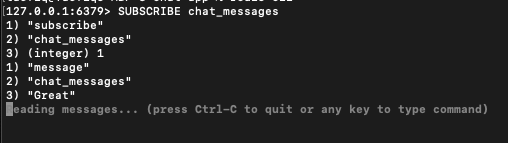
To view shared published messages, use the same command redis-cli Run and SUBSCRIBE channelName Enter channelName about us. chat_messages If you send a text you should have something like this in your terminal: Great from the browser:
Now, we can run multiple instances of our server on different ports or even different machines, and as long as they subscribe to the same Redis channel, they can receive and broadcast messages to all connected clients, ensuring that users can chat seamlessly across instances.
Remember in the introduction section we talked about implementing the Pub/Sub pattern using a message broker? This example sums it up perfectly.
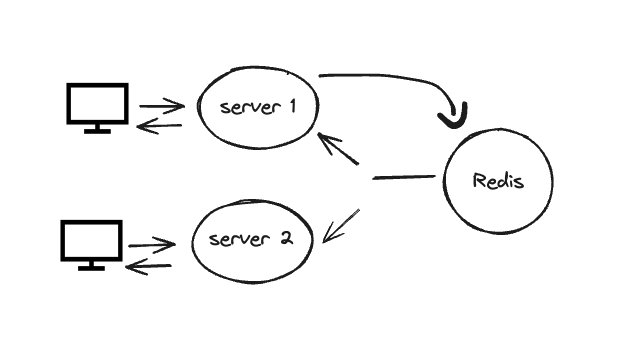
In the above figure, 2 different clients (browsers) are connected to the chat servers. The chat servers are not connected directly, but through a Redis instance. This means that while they handle client connections independently, they share information (chat messages) over a common medium (Redis). Each chat server above connects to Redis. This connection is used to publish messages to Redis and subscribe to Redis channels to receive messages. When a user sends a message, the chat server publishes it to the specified channel in Redis.
When Redis receives a published message, it broadcasts the message to all the participating chat servers. Each chat server then sends the message to all connected clients, ensuring that every user receives the messages sent by every user, regardless of which server they are connected to.
This architecture allows us to scale our chat application horizontally by adding more server instances as needed. Thanks to the capabilities of the Redis publish/subscribe system, which ensures uniform message distribution across all instances, each instance can manage its own set of connected clients. This setup is efficient for handling a large number of concurrent users and ensures the availability of your application.
Result
In this tutorial, we learned about the Publish/Subscribe pattern while creating a simple chat application to demonstrate this pattern, using Redis as a message broker. The next step is to learn how to implement a peer-to-peer messaging system in cases where a message broker may not be the best solution, for example, in complex distributed systems where a single point of failure (broker) is not an option.